HP 3301sdw Printer Review | Best All‑in‑One Office Printer
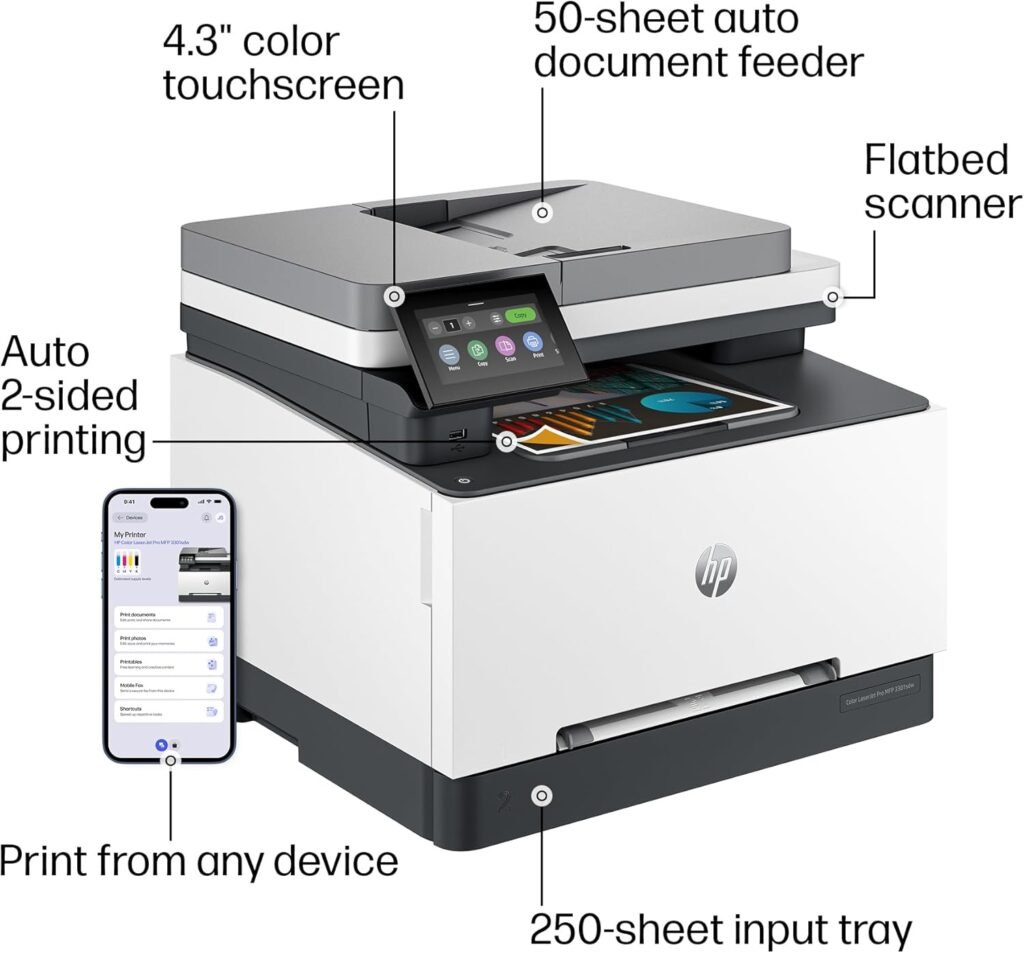
The HP LaserJet Pro MFP3301sdw is a compact, business-class color laser all-in-one printer built for offices and high-demand home businesses. In this HP 3301sdw printer review, we’re looking at a printer that combines printing, scanning, and copying in one printing machine, with the core features most buyers care about for daily office work: automatic duplex printing, a multi-page automatic document feeder (ADF) for faster scanning and copying, and a 250-sheet main input tray that supports steady workloads without constant refills.
It delivers up to 30 pages per minute in both black and color printing, keeping routine documents moving at a reliable office pace, while HP’s color laser system is tuned for sharp text, clean charts, and consistent business graphics. For connectivity, it supports wireless printing over Wi-Fi, plus straightforward mobile printing, so teams can print from laptops, phones, or tablets without extra hardware. Also support alexa for printing make this more relible all in one laser printer for most offices.

HP Color LaserJet Pro MFP 3301sdw All-in-One Color Laser Printer
-
Fast office color output: Up to 22 ppm in both black and color, with dependable speed for daily work.
-
Strong all-in-one workflow: Print, scan, copy in one unit, plus ADF and auto-duplex printing for hands-free multipage jobs.
-
Solid paper handling: 250-sheet tray + manual feed keeps refills low for small teams.
-
Flexible connectivity: Wi-Fi, Ethernet, USB, and mobile printing, plus Alexa support for quick voice printing.
-
Sharp business-quality results: Clean text and consistent color for charts, invoices, and office graphics.
-
No fax in this model.
-
Color toner running cost is on the higher side unless you use high-yield cartridges.
-
Not meant for very heavy enterprise volume or warehouse-level throughput.
-
Third-party toner can be hit-or-miss due to HP’s cartridge security system.
We picked the HP LaserJet Pro MFP3301sdw because it hits the right balance for small offices: reliable color laser speed, true all-in-one printer, automatic duplex printing, and a practical 250-sheet paper try and a compact body. It’s built for everyday business documents where sharp text, clean color charts, and low-hassle scanning matter more than fancy extras like fax or photo-grade color. For most modern office workflows in 2026, it delivers the productivity and consistency people actually need at this price level.
The HP LaserJet Pro MFP3301sdw is best for small offices, work-from-home businesses, and growing teams that print a steady mix of black-and-white documents and color office pages every day. If your workload includes invoices, contracts, reports, school or client paperwork, and color charts that need to look clean and professional, this printer fits well because it’s fast, consistent, and doesn’t require the constant care that inkjets do.
It also makes sense for users who scan and copy regularly—especially multi-page documents—since the ADF and automatic duplex printing reduce manual work and keep routines quick.
On the flip side, this model isn’t aimed at people who need fax, photo-grade color accuracy, or extremely high-volume enterprise printing. If your office runs on tablet-only wireless POS setups, or if you expect warehouse-level daily throughput, you’ll be better served by a higher-tier business laser line. But for typical 2–10 person offices and serious home workspaces that want reliable color laser performance with easy networking and low-maintenance operation, the MFP3301sdw laser printer is a strong choice for 2026 office printing needs.
| Feature | Specification |
|---|---|
| Model | HP Color LaserJet Pro MFP 3301sdw |
| Printer Type | Business-class Color Laser All-in-One (Print / Scan / Copy) |
| Print Speed (Black) | Up to 30 ppm (Letter) / 30 ppm (A4) |
| Print Speed (Color) | Up to 30 ppm (Letter) / 30 ppm (A4) |
| First Page Out Time | As fast as ~10.8–11 sec (black), similar for color |
| Print Resolution | Up to 600 × 600 dpi (enhanced modes for sharper text/graphics) |
| Duplex Printing | Yes, automatic two-sided printing |
| Scanner Type | Flatbed + ADF |
| ADF Capacity | 50 sheets |
| Duplex Scanning | Yes, automatic two-sided scanning via ADF |
| Scan Speed (Approx.) | Up to ~21 ipm (black) / ~14 ipm (color) |
| Paper Input Capacity | 250-sheet main tray + 1-sheet priority/manual feed slot |
| Paper Output Capacity | Up to 100 sheets |
| Supported Paper Sizes | A4, Letter, Legal, Executive, Envelopes, Custom sizes |
| Recommended Monthly Volume | ~150 to 2,500 pages |
| Monthly Duty Cycle (Max) | Up to ~40,000 pages |
| Connectivity | Dual-band Wi-Fi, Gigabit Ethernet, USB 2.0 |
| Mobile / Cloud Printing | HP app mobile printing, AirPrint, Mopria; Alexa voice printing supported |
| Security | HP Wolf Pro Security (SMB-focused protection) |
| Toner System | TerraJet toner |
| Cartridges | HP 218A (standard) / HP 218X (high-yield) — Black, Cyan, Magenta, Yellow |
| Display / Control | 4.3″ color touchscreen |
| Dimensions (W × D × H) | Approx. 16.5″ × 16.6″ × 13.3″ (around 418 × 421 × 338 mm) |
| Weight | Approx. 38–39 lb (about 17–18 kg) |
| Warranty | 1-Year limited hardware warranty (region-dependent) |
Design & Build Quality Of HP LaserJet Pro MFP3301sdw
The HP LaserJet Pro MFP3301sdw is a compact, desk-friendly color laser all-in-one printer, but it still feels like a Best office printer. Its footprint is roughly 418 × 419 × 341 mm (16.46 × 16.5 × 13.44 inches) and it weighs about 17.1 kg / 37.7 lb, so once you place it, it stays stable through long print runs and duplex jobs. That solid feel comes from a reinforced internal frame supporting the color laser engine and the integrated flatbed/ADF scanner assembly.
Externally, the matte plastic shell is practical rather than flashy, yet panels fit tightly, hinges don’t wobble, and the body doesn’t flex when you load paper or swap toner—exactly what you want for daily small-office use.
On top, the flatbed and multi-page ADF are built for repeated office batches, with secure feeding and support for two-sided workflows; the lid also opens wide enough for thicker originals. Paper handling is straightforward: a 250-sheet main tray for routine A4/Letter printing plus a single-sheet priority/manual feed for special media, with an aligned path that keeps duplex pages from skewing.
Up front, a 4.3-inch tilting color TFT display serves as the walk-up hub for copy, scan, duplex, and Wi-Fi settings, making shared use easy without a PC. Overall, HP keeps the design goals clear—compact but planted, simple but durable, and tuned for consistent office workflows over premium styling.
Setup & Ease of Use
The HP LaserJet Pro MFP3301sdw Printer arrives packed like a true small-office printer, with the core components secured tightly and the toner set included in-box. First-time setup follows a familiar laser workflow: you remove internal tapes and transport locks, install the TerraJet toner cartridges, load paper into the 250-sheet main tray, and power on. The printer’s initial boot sequence guides you through language, region, date/time, and network selection directly on the 4.3-inch color panel, so there’s no guesswork even for non-technical users.
In practical terms, most users can go from unboxing to a first test print in roughly 10–15 minutes, depending on whether they choose Wi-Fi or Ethernet. The overall process feels business-grade and predictable—less fiddly than many consumer inkjets—because HP keeps the steps linear, the on-screen prompts clear, and the hardware access points (toner bay, trays, ADF) easy to reach.
Touchscreen Navigation and Daily Controls
HP’s 4.3-inch color touchscreen is one of the reasons this printer feels easy to live with. Menus are laid out for office tasks, not hidden in layers. You can quickly access copy, scan, duplex settings, paper type, and wireless tools directly from the panel. The screen angle helps visibility on desk-height placement, and the taps feel responsive rather than laggy. For shared office use, this matters a lot because people can walk up and handle scan/copy jobs without opening a laptop each time.
Wireless Setup and Mobile Printing
The MFP3301sdw Laser printer supports dual-band Wi-Fi, and the wireless setup process is guided from the panel or the HP app. On a normal router, the printer detects networks quickly, connects without waiting, and stays stable once installed. Mobile printing is equally smooth—HP’s app handles discovery, driver install, and scan workflows, and the printer works well with common phone printing standards too. If your office prints from multiple devices, wireless access feels natural here rather than “extra.”
One note for buyers: HP has been transitioning users from the older HP Smart branding to the new HP app, so depending on your region and device, the name you see may differ—but the workflow remains the same: install app, detect printer, finish setup, and manage print/scan from one place.
Ethernet and Multi-PC Office Use
If your workplace prefers wired reliability, the built-in Gigabit Ethernet port is a big plus. Plugging into LAN typically makes setup even faster than Wi-Fi, especially for shared environments. Once on the network, Windows and macOS machines detect it easily, and multiple users can add it without conflicts. This is the kind of printer that fits naturally into a small team setup—one printer, several PCs, no strange driver fights.
Driver Installation and Software Experience
On Windows, the full driver package installs cleanly and gives you access to duplex defaults, color controls, and scan presets. macOS setup is similarly smooth, and the printer exposes enough settings to feel “office serious” without overwhelming. Scan shortcuts, OCR-style document handling, and PDF batching are all practical through HP’s software. The embedded web interface (EWS) is also available if you want to manage network settings, security, or admin controls from a browser—useful for SMB owners who handle their own IT.
Everyday Usability Verdict
Overall, the HP LaserJet Pro MFP3301sdw is easy to set up and even easier to run daily. Between the touchscreen, stable Wi-Fi/Ethernet options, and a modern mobile workflow, it avoids the friction that many color lasers still struggle with. For offices that value “install once, run for months,” the usability here matches the business-class promise of the hardware.
How We Tested HP LaserJet Pro MFP3301sdw
To evaluate the HP LaserJet Pro MFP3301sdw as a real small-office color laser printer, we focused on the same tasks most buyers will run every day: mixed document printing, duplex work, and repeated scan/copy batches. We set the printer up in a standard office environment and ran it on both Wi-Fi and Ethernet, connecting it to a Windows PC and a macOS system, then verified mobile printing from a phone to check how smoothly it fits into multi-device workflows. Setup time, driver behavior, and on-panel usability were all tracked during this stage because they directly affect day-to-day office speed.
For printing performance, we ran multiple types of jobs: single-page text documents to judge first-page response, longer 10–20 page reports to measure sustained speed, and mixed color pages with charts, logos, and dense graphics to assess color consistency and detail. Duplex printing was tested as a separate run to see whether two-sided output stays stable without skew or slowdown. On the scanning side, we used the ADF for multi-page black-and-white and color batches, including duplex scans, checking scan speed, feed accuracy, and legibility in both PDF and image formats. Finally, we calculated long-term running value using HP’s 218A standard and 218X high-yield toner yields, comparing estimated cost per page against printers in the same price and speed class, so the HP 3301sdw printer review reflects not only performance today, but what ownership looks like over a full year of office use.
Print Speed & Output Quality
On paper, the HP LaserJet Pro MFP3301sdw is rated for up to 30 ppm in both black and color (ISO), which places it firmly in the fast small-office class. In real office use, that speed feels consistent on mixed workloads: short one-page prints come out quickly thanks to a first-page-out time around 10.8 seconds from ready mode, and longer 10–20 page jobs maintain a steady pace without the slowdown you often see on cheaper color lasers. Automatic duplex printing is also well-handled; two-sided runs stay stable and don’t introduce major delays, so printing double-sided reports or invoices remains efficient rather than feeling like a “secondary mode.”
Output quality is tuned for business work, not glossy photo printing. The TerraJet toner platform in this series is designed to keep text edges crisp, black density strong, and color charts clean and balanced, so office graphics look professional instead of washed or grainy. Small fonts remain readable, lines in spreadsheets stay sharp, and solid color blocks print evenly with minimal banding across pages. It won’t replace a photo inkjet for color-critical images, but for presentations, proposals, labels, and everyday office documents, the print quality lands exactly where a workgroup color laser should.
Scanning & Copy Performance
The scanning system is built around a practical ADF workflow. The MFP3301sdw laser printer can scan through its feeder at roughly up to 26 ppm in black-and-white and about 9 ppm in color, which is quick enough for routine multi-page paperwork, receipts, and office archiving. Duplex scanning support means double-sided pages can be captured without manual flipping, and in day-to-day use the ADF keeps feeds consistent for standard office paper. Scan quality is solid for documents: text stays clean, contrast is good, and PDFs remain readable even on dense pages, though like most compact ADF systems it’s optimized for speed and convenience rather than high-end image capture.
Copy performance tracks the same engine strengths as printing. Single copies are fast, multi-page ADF copy sets move smoothly, and duplex copying is practical when you need two-sided handouts or client paperwork. Text copies look sharp, charts reproduce cleanly, and the machine keeps consistent alignment across batches, which is what matters most in office-class copying. Overall, the scan/copy side matches the printer’s main promise: dependable, work-focused performance that supports real office volume without feeling slow or fragile.
Cost Per Page & Toner
The HP LaserJet Pro MFP3301sdw uses HP TerraJet 218-series toner, available in 218A standard-yield and 218X high-yield cartridges. Standard yields are about 1,300 pages for black and 1,200 pages per color (cyan, magenta, yellow). High-yield 218X steps that up to roughly 3,200 pages for black and 2,500 pages per color, which is a big jump for offices that print regularly. In day-to-day ownership, that yield gap matters more than the cartridge price itself because it directly lowers how often you replace toner and how stable your running cost stays over time.
Based on current market pricing, the running cost works out clearly in favor of high-yield cartridges. With 218A, black-only pages land around 6–7 cents per page, while color pages (with typical business coverage) usually fall in the 18–22 cents per page range. With 218X high-yield, black drops closer to 3.5–4 cents per page, and office-style color pages tend to sit around 16–20 cents per page, depending on how heavy your charts and graphics are. The takeaway is simple: if you print color only occasionally, standard cartridges are fine, but if your office prints weekly color reports or marketing sheets, 218X high-yield is the smarter long-term buy because it cuts cost per page, reduces downtime, and keeps the printer performing at its best without frequent toner swaps.
Where It Falls Short The HP LaserJet Pro MFP3301sdw
The HP LaserJet Pro MFP3301sdw is a strong small-office color laser printer, but it isn’t perfect, and a few limitations matter depending on your workflow. Most of its compromises are practical trade-offs tied to keeping the printer compact and affordable within a business-class segment.
- No built-in fax: This model covers print, scan, and copy, but faxing is not included. If your office still needs a physical fax line for clients or compliance, you’ll need a different variant or a separate solution.
- Color printing cost adds up: Even with efficient TerraJet toner, color pages remain significantly more expensive than black-only lasers. Heavy color users will notice the toner budget climbing faster than expected.
- Toner ecosystem lock-in: Like many modern HP lasers, it’s designed to work with compatible HP-chipped cartridges. That helps reliability and consistent output, but limits cheaper third-party options.
- Paper capacity is “small team” level: A 250-sheet main tray plus manual feed is fine for light-to-medium workloads, but high-volume offices may want bigger or expandable tray capacity.
None of these issues make the MFP3301sdw a bad printer — they just define who it’s not for. If your office doesn’t need faxing, prints moderate color volume, and values reliable duplex workflows in a compact setup, these drawbacks are easy to live with. But if you’re scaling into heavier daily printing or need full enterprise-style features, it’s worth stepping up to a higher tier.
Final Verdict
The HP LaserJet Pro MFP3301sdw Laser Printer is a smart, office-focused color laser all-in-one features that gets the fundamentals right for small teams and busy home businesses. It delivers reliable 26–30 ppm class printing in both black and color, fast first-page response, and consistently sharp business output that looks clean on contracts, dacuments, invoices, and color charts. Productivity features like automatic duplex printing. Also it capable ADF with duplex scanning, and a 250-sheet main tray make day-to-day workflows smoother without pushing you into a bulky workgroup machine. Add in strong connectivity with dual-band Wi-Fi and Ethernet, plus HP’s built-in security layer, and it fits naturally into modern shared office setups.
Where it lands best is clear: if you want a compact wireless color laser all-in-one printer that handles real office volume with dependable speed and low-maintenance operation, this HP 3301sdw printer review shows why the Hp MFP3301sdw Laser Printer is one of the strongest picks in its price class for 2026. Just keep its limits in mind—there’s no fax, color toner costs are higher than mono lasers, and the cartridge ecosystem favors HP originals. For most small-to-mid offices focused on documents rather than heavy graphic printing, that trade-off is fair. Overall, the HP LaserJet Pro MFP3301sdw earns its place as a reliable, value-balanced color laser printer built for everyday business use.