


The Epson ET-8550 is designed for creators and photo enthusiasts who want to print beyond standard letter-size sheets without incurring high cartridge costs. It pairs borderless printing up to 13 × 19 inches (A3+) with an economical 6-color EcoTank system, flatbed scanning, and standalone copying. While ideal for portfolio prints, display photos, and fine art media, it offers far more capacity than needed if your daily work only involves routine black-and-white paperwork.
Is the Epson ET-8550 Right for Your Printing Needs?
The deciding factor is whether your workflow regularly demands wide-format output and fine-art media compatibility. The ET-8550 offers multiple paper feeds, including a direct 1.3 mm rear path for rigid cardstock.
However, keep the hardware trade-offs in mind: while it prints up to A3+, the built-in flatbed scanner tops out at Legal size (8.5 × 14 inches). Additionally, it lacks an Automatic Document Feeder (ADF), meaning multi-page document scanning must be done sheet by sheet manually.
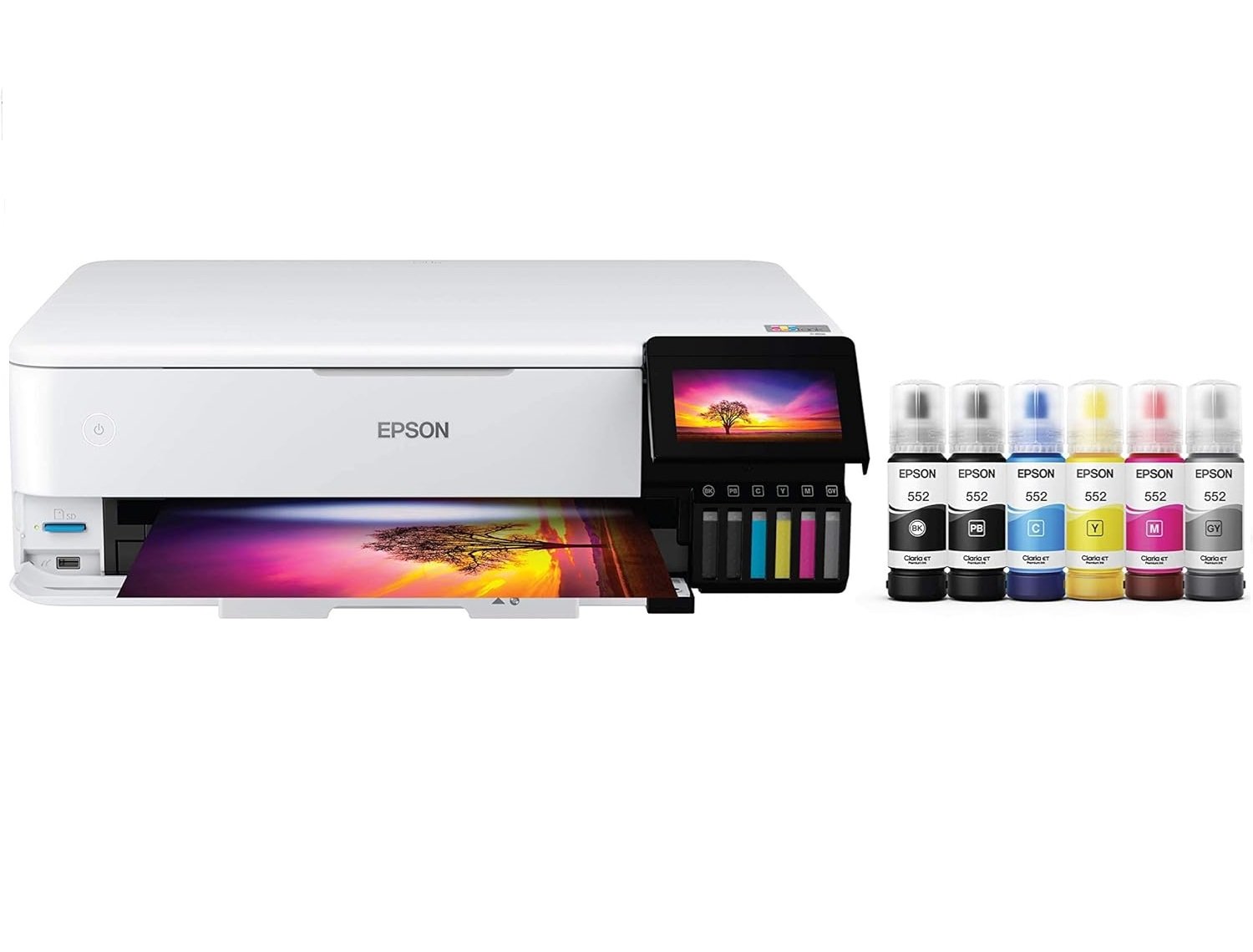
Epson ET-8550 All-in-One Supertank Printer
- Excellent photo quality with 6-color Claria ET Premium ink
- Borderless photo printing up to 13″ x 19″
- Refillable EcoTank system helps reduce long-term ink costs
- Print, scan, and copy functions in one machine
- Supports thick media up to 1.3mm through rear straight pass
- Automatic 2-sided printing for everyday documents
- Multiple connectivity options including Wi-Fi, Ethernet, USB, and mobile printing
- Great option for photographers, crafters, artists, and creative home users
- Higher upfront price than standard home printers
- No automatic document feeder for scanning multiple pages
- Large footprint compared with compact printers
- Not as fast as business-focused office printers
- Best results require good paper and genuine photo ink
This printer is best suited for visual artists, serious photography hobbyists, Etsy shop owners, and creative studios producing short-run art prints, greeting cards, and marketing collateral.It is not recommended for busy corporate environments requiring high-speed multi-page document scanning, dual-sided 11×17 ledger paperwork, or unattended high-volume document batches.
- Printer Type: All-in-one wide-format supertank photo printer
- Functions: Print, copy, and scan
- Ink Engine: 6-color Claria ET Premium (1 Pigment Black for text + 5 Dye Inks: Photo Black, Gray, Cyan, Magenta, Yellow)
- Max Print Resolution: 5760 x 1440 optimized dpi
- Print Speeds: Up to 16 ISO ppm (black), 12 ISO ppm (color)
- Photo Speed: 4″ x 6″ borderless photo in approx. 15 seconds (Draft mode); standard photo modes take longer for maximum detail
- Max Print Size: Borderless printing up to 13″ x 19″ (Super B / A3+)
- Scanner Type: CIS Flatbed color scanner (Max scan size: 8.5″ x 14″ Legal)
- Optical Hardware Resolution: 1200 x 4800 dpi
- Paper Loading: Dual front cassettes (100-sheet plain paper + 20-sheet photo tray), 50-sheet rear paper feed, and 1-sheet rear straight pass
- Media Thickness: Handles specialty cardstock & poster board up to 1.3 mm thick
- Duplex Printing: Automatic 2-sided printing (Supports up to Letter/A4 size only)
- Control Panel: 4.3″ color touchscreen LCD
- Connectivity: Wi-Fi 5, Wi-Fi Direct, Ethernet (10/100), USB, SD Card slot
- Mobile Support: Epson Smart Panel, Epson Print Layout, Apple AirPrint, Mopria
- Bonus Media: Direct CD/DVD surface printing
Epson ET-8550 Review: Design and Build Quality
The Epson ET-8550 has a clean and modern design, but it is larger than a normal home printer because it supports wide-format printing up to 13″ x 19″. This size makes sense for a photo-focused all-in-one printer, especially for users who want to print larger artwork, posters, photos, and creative projects at home.
The printer includes a 4.3-inch touch display that makes navigation easier. You can access printer settings, maintenance options, copy controls, and common functions without depending completely on a computer. The front ink tanks are easy to see, which helps you check ink levels quickly before starting larger print jobs.
Print Quality & Ink Formulation
Print quality is the standout asset of the ET-8550. Rather than using a standard 4-color CMYK array, Epson equips this unit with a hybrid 6-color Claria ET Premium set.
- Pigment Black: Dedicated strictly to plain-paper office printing, producing laser-crisp, smudge-resistant text.
- Dye-Based Photo Palette (Photo Black, Gray, Cyan, Magenta, Yellow): Delivers vivid color gamuts on glossy papers and eliminates color casting in black-and-white portraits due to the dedicated gray channel.
Photo Printing Performance
The Epson ET-8550 is one of the best choices for users who want photo printing at home without constantly buying expensive cartridges. It supports borderless printing up to 13″ x 19″, which is useful for photographers, artists, and creators who want larger prints.
It can print standard 4″ x 6″ photos quickly, and it also handles larger formats such as 5″ x 7″, 8″ x 10″, letter size, A4, 11″ x 17″, and A3+. This flexibility makes it useful for both casual users and serious creative projects.
Wide-Format Printing
Wide-format support is a major advantage of the Epson ET-8550. Many home printers stop at letter or A4 size, but the ET-8550 can print larger borderless photos and artwork up to 13″ x 19″. This gives creators more freedom for posters, wall art, photo enlargements, portfolio prints, and craft designs.
The printer also supports different paper types, including glossy photo paper, premium photo paper, matte presentation paper, fine art paper, cardstock, envelopes, and specialty media. This makes it more flexible than a standard home printer.
EcoTank Ink System and Running Costs
The refillable EcoTank system is one of the biggest selling points of the Epson ET-8550. Instead of using small ink cartridges, it uses high-capacity ink bottles. This can be more cost-effective for users who print photos and documents regularly.
The printer uses six ink bottles: Black, Photo Black, Cyan, Magenta, Yellow, and Gray. The EcoFit bottle design also helps reduce filling mistakes because the bottles are designed to fit the correct tanks.
For users who print frequently, the long-term savings can be one of the main reasons to choose this printer. The upfront price is higher, but the lower ink cost can make more sense over time.
Scanning & Copying Considerations
While the printer handles 13″ x 19″ paper output, the integrated flatbed scanner glass measures 8.5″ x 14″ (Legal size). It achieves sharp scans at up to 1200 x 4800 dpi optical resolution—ideal for scanning family portraits, single illustrations, and standard contracts. However, the lack of an Automatic Document Feeder (ADF) means users with large stacks of paperwork will find scanning and copying time-consuming.
Paper Handling & Layout Versatility
Paper management is divided across versatile pathways to prevent manual swapping:
- Lower Front Cassette: Holds up to 100 sheets of plain standard paper.
- Upper Front Photo Tray: Holds up to 20 dedicated photo sheets (up to 5″ x 7″).
- Rear Feeder: Accommodates up to 50 sheets of plain paper or larger photo formats up to 13″ x 19″ (A3+).
- Rear Straight-Through Path: A dedicated slot designed for thick, rigid media up to 1.3 mm thick (such as poster board or heavy fine art rag paper).
Note: Automatic 2-sided (duplex) printing is supported for everyday documents up to Letter/A4 size; larger format media (such as 11″ x 17″ or 13″ x 19″) requires manual reloading for two-sided jobs.
Connectivity and App Support
The Epson ET-8550 offers several connectivity options, including Wi-Fi, Wi-Fi Direct, Ethernet, Hi-Speed USB, SD card, and mobile printing. This gives users flexibility depending on how they want to print.
For mobile users, Epson Smart Panel can help with setup, monitoring, and printing from a smartphone. Epson Print Layout is useful for photo printing workflows, while Apple AirPrint, Android printing, and Mopria support make the printer easier to use across different devices.
Ease of Use
The Epson ET-8550 is easier to use than many older photo printers because of its touch display, refillable ink tanks, mobile app support, and multiple paper paths. The ink tanks are visible from the front, so users can check ink levels at a glance.
For best results, users should still spend time choosing the correct paper type, print quality setting, and color options. Photo printing depends heavily on paper and settings, so using the right profile and media selection can make a big difference.
Epson ET-8550 vs. Epson ET-8500
The primary difference is maximum print size. The ET-8550 supports wide-format media up to 13″ x 19″ (A3+), whereas the smaller ET-8500 caps out at standard 8.5″ x 11″ (Letter / A4) prints. Both share identical 6-color ink engines and printhead resolutions. If you have limited desk space and will never print larger than 8.5″ x 11″, the ET-8500 offers the same low ink costs in a more compact chassis.
| Feature / Specification | Epson EcoTank ET-8550 | Epson EcoTank ET-8500 |
|---|---|---|
| Printer Category | Wide-Format (A3+) All-in-One | Standard-Format (Letter / A4) All-in-One |
| Maximum Print Size | Up to 13″ × 19″ (Super B / A3+) | Up to 8.5″ × 11″ (Letter / A4) |
| Scanner Flatbed Size | 8.5″ × 14″ (Legal size) | 8.5″ × 11.7″ (Letter / A4 size) |
| Max Paper Feed Width | 13 inches wide | 8.5 inches wide |
| Thick Media Pass (Straight Path) | Up to 1.3 mm (up to 13″ wide) | Up to 1.3 mm (up to 8.5″ wide) |
| Ink System | 6-Color Claria ET Premium (Same) | 6-Color Claria ET Premium (Same) |
| Max Print Resolution | 5760 × 1440 optimized dpi | 5760 × 1440 optimized dpi |
| Auto 2-Sided Printing | Yes (Up to Letter / A4 only) | Yes (Up to Letter / A4) |
| Automatic Document Feeder (ADF) | No (Flatbed only) | No (Flatbed only) |
| Display Screen | 4.3″ Color Touchscreen | 4.3″ Color Touchscreen |
| Direct CD / DVD Printing | Yes | Yes |
| Dimensions (W × D × H) | 20.6″ × 14.9″ × 6.7″ | 15.9″ × 14.1″ × 6.7″ |
| Weight | 24.5 lbs (11.1 kg) | 17.6 lbs (8.0 kg) |
| Typical Price Difference | Higher (Due to wide-format carriage) | Approx. $100–$150 less expensive |
“`Kya is table ko aap ke accordion layout ke andar adjust karna hai, ya comparison section ke neeche independent rakhna behtar rahega?
Who Should Buy the Epson ET-8550?
- Photographers who want high-quality home photo printing
- Creators who need borderless prints up to 13″ x 19″
- Artists and designers who print artwork, posters, and portfolio pieces
- Crafters who need support for cardstock and specialty media
- Families who print photos, school projects, and documents
- Small business users who create labels, product inserts, and creative materials
- Users who want refillable ink tanks instead of expensive cartridges
Who Should Skip It?
- Users who only print a few basic documents each month
- Buyers who need a cheap entry-level printer
- Offices that need an automatic document feeder for scanning stacks of pages
- Users who want the fastest business document printer
- People who do not need wide-format photo printing
Final Verdict
The Epson ET-8550 bridges the gap between costly professional photo printers and economical ink-tank office machines. While it does not include an ADF and its auto-duplexing is limited to letter/A4 sizes, its combination of 13″ x 19″ borderless output, 1.3 mm thick media support, and ultra-low cost-per-print makes it one of the most capable creative all-in-one printers currently available.
As this Epson ET-8550 Review shows, the Epson ET-8550 is a strong choice if you want the Best All-in-One Supertank Printer for creative projects and one of the Best Photo Printer options for high-quality wide-format prints at home.