Canon iP8720 Printer Review | Best Printer With AirPrint Support
The Canon iP8720 Wireless Printer is a wide-format photo inkjet built for users who prioritize image quality over office features. Rather than functioning as an all-in-one, this single-function printer is dedicated entirely to producing beautiful borderless photos up to 13″ × 19″, vibrant posters, and gallery-grade prints right from your home studio. Its 6-color individual ink system — including a dedicated gray — works alongside a high 9600 × 2400 dpi engine to deliver smoother gradients, better shadow depth, and more accurate color reproduction than typical 4-ink home printers. It’s a strong choice for photographers, designers, artists, and creative hobbyists who want professional-looking prints without investing in expensive pro-level gear, making it a standout option in any detailed Canon iP8720 Printer Review.
In this Canon iP8720 Printer Review, we’ll look at how it performs as a photo-first printer in 2026—covering setup, wireless printing, everyday usability, and real-world print quality for both photos and documents. We’ll also explore how its ink costs, large-format capabilities, and feature set compare to other popular wide-format options, so you can decide if the PIXMA iP8720 is the right fit for your photography, crafting, or home-studio workflow.
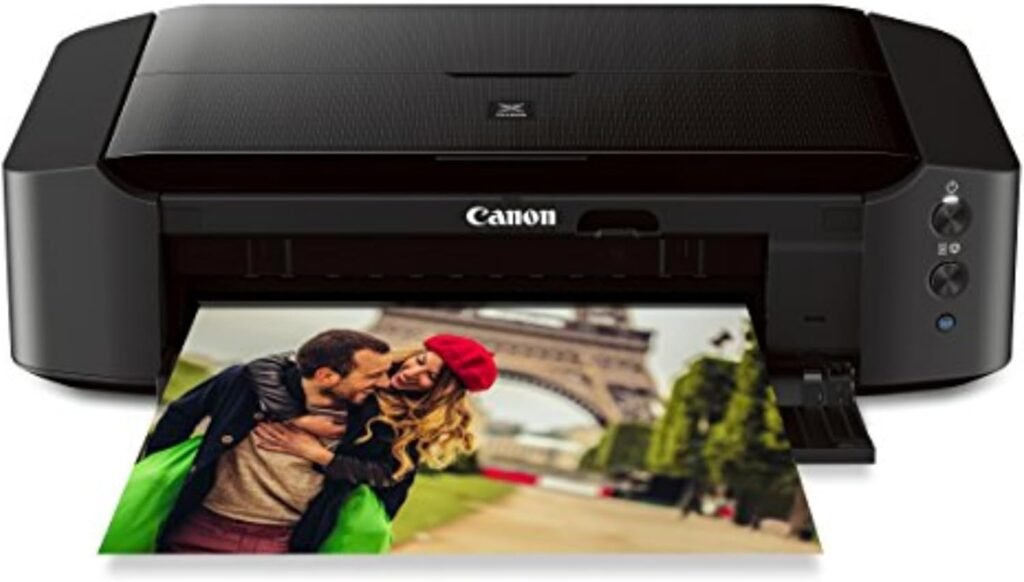
Canon IP8720 Wireless Photo Printer | AirPrint & Cloud Support
-
Excellent 13″ × 19″ borderless photo printing for large, high-quality images
-
9600 × 2400 dpi resolution with a 6-color ink system for rich color and smooth gradients
-
Individual ink tanks help reduce replacement costs over time
-
Easy wireless printing through AirPrint, Google Cloud Print, and Canon apps
-
Supports CD/DVD disc printing and a wide range of specialty media
-
Compact, quiet, and more affordable than many wide-format photo printers
- No scanning, copying, or faxing (print-only design)
- Ink costs are higher for frequent photo printing
- No automatic duplex (two-sided) printing
- Rear paper tray only — no front cassette
- Larger 13×19″ prints take longer to complete
We chose the Canon iP8720 because it offers one of the best balances of wide-format photo quality, wireless convenience, and affordability in its class. With its 6-color individual ink system—including a dedicated gray tank for smoother gradients—the Canon iP8720 produces richer tones and more accurate color than standard 4-ink models. This makes it an excellent contender for anyone looking for the Best Photo Printer for home studios, crafts, posters, and gallery-style prints up to 13″ × 19″.
Another major reason it stands out is its seamless wireless experience. The printer works effortlessly with AirPrint, Google Cloud Print, and Canon’s mobile apps, giving iPhone, iPad, and Mac users a simple, reliable way to print high-quality photos without any complicated setup. For people seeking the Best AirPrint Printer specifically for photo output rather than office tasks, the iP8720 delivers exceptional value.
Unlike bulky professional printers, the Canon iP8720 keeps its footprint manageable and its operation quiet, making it ideal for apartments, dorms, and creative workspaces. It brings near-professional print quality to an accessible price point, which is why it remains one of the most compelling wide-format photo printers on the market in 2026.
The Canon iP8720 Wireless Printer is best suited to users who primarily care about high-quality photo and graphic output rather than office-style features. It’s a strong match for photographers, artists, designers, crafters, and students who want to print borderless images up to 13″ × 19“, create posters or art prints, and get richer color and smoother gradients than a basic home printer can provide. It also works well for Apple users who want simple wireless printing via AirPrint without dealing with a bulky all-in-one. On the other hand, it’s not aimed at offices that need scanning, copying, faxing, or very fast text printing—those users will be better served by a multifunction, document-focused color printer.
| Key Feature | Details |
|---|---|
| Model | Canon PIXMA iP8720 Wireless Photo Printer |
| Printer Type | Single-function color inkjet (print only) |
| Max Print Size | Up to 13″ × 19″ borderless (wide-format) |
| Print Resolution | Up to 9600 × 2400 dpi (color) |
| Ink System | 6 individual inks (PGI-250 pigment black + CLI-251 C/M/Y/Black/Gray) |
| Photo Print Speed | Approx. 36 seconds for 4″ × 6″ borderless photo |
| Document Print Speed | Approx. 14.5 ipm black / 10.4 ipm color |
| Paper Capacity | 150-sheet rear input tray |
| Connectivity | Wi-Fi (802.11 b/g/n), USB |
| Mobile & Cloud | AirPrint, Google Cloud Print, Canon PRINT app, Wireless PictBridge |
| Special Media | CD/DVD/Blu-ray disc printing, glossy/matte photo paper, specialty media |
| Ideal For | Photographers, creators, and home studios needing large, high-quality photo prints |
Design & Build Quality
The Canon iP8720 features a low-profile, wide-format design that fits comfortably on a desk while still supporting large 13″ × 19″ prints. Its matte black chassis gives it a simple, modern look, and the overall layout is functional rather than bulky. The rear paper tray handles a range of media sizes and photo papers without fuss, and the output tray extends smoothly when printing larger formats. Although the printer is primarily plastic, the build feels solid enough for regular use, with consistent paper feeding and minimal vibration during printing. It’s engineered for photo production rather than heavy-duty office workloads, but for home studios and creative environments, the construction is stable, reliable, and well-suited to its purpose.
Print Quality Performance
Overall, the Canon iP8720 is clearly tuned for image and photo work rather than general office output. Its print engine, ink system, and resolution are all optimized to bring out detail, smooth gradients, and accurate color in photos and graphics. It still handles everyday documents without issues, but the real value of this printer shows up when you feed it high-quality photo paper and large-format projects. If you’re judging it purely on photo and color performance, it sits well above typical home inkjets in the same price range.
Text Printing – Sharp Enough for Documents but Not Its Primary Strength
While the Canon iP8720 can produce crisp and readable text, it’s clear that document printing isn’t its primary purpose. Characters appear clean with good edge clarity, but this printer is optimized for color accuracy and image reproduction rather than heavy office-style text output. For occasional letters or basic documents, it performs well; however, users buying this model will benefit most from its photo and graphics capabilities rather than text printing alone.
Photo Printing – Exceptional Detail at 9600 × 2400 dpi
The Canon iP8720 excels in photo production. With its 9600 × 2400 dpi resolution, prints display impressive sharpness and fine detail, even in large 13×19″ borderless photos.
Its 6-color ink system, including a dedicated gray, supports:
- Smooth, natural gradients without visible banding
- Accurate skin tones and vibrant colors
- Excellent grayscale and black-and-white output with deeper shadow detail
This combination makes it suitable for hobbyists, photo enthusiasts, and anyone producing high-quality visual work.
Color Accuracy – Better Tonal Depth Than 4-Ink Printers
Thanks to its expanded ink system, the Canon iP8720 achieves richer tonal depth and more balanced saturation compared to typical 4-ink models. Colors remain consistent across glossy, semi-gloss, and matte papers, making it a strong choice for:
- Graphic design
- Art prints
- Posters
- Craft and DIY projects
Color transitions appear smoother, and tones maintain a natural look—ideal for users who want reliable, high-quality output without moving to a professional-grade printer.
Connectivity & Compatibility
The Canon iP8720 offers the key modern connections you need for a home studio or creative workspace. Built-in Wi-Fi lets you print wirelessly from laptops, phones, and tablets, while AirPrint support makes it especially convenient for iPhone, iPad, and Mac users. You can also fall back to a USB connection if you prefer a direct, stable link. Setup is simple, and once on the network, the printer generally stays connected without needing constant reconfiguration.
In terms of compatibility, the Canon iP8720 works smoothly with Windows, macOS, AirPrint, and Canon’s PRINT app, so it fits easily into most workflows. It handles a wide range of media types and sizes—from standard letter paper to glossy, matte, and wide-format 13×19″ photo sheets—which is a big plus for photographers, artists, and crafters. Whether you’re printing from Adobe software, mobile photo galleries, or basic document apps, the printer integrates cleanly without forcing you into a locked-down or proprietary ecosystem.
Print Speed & Efficiency
The Canon iP8720 isn’t built to churn through huge office print queues, but its speeds are perfectly reasonable for a photo-centric printer. It’s rated at up to 14.5 ipm for black-and-white documents and 10.4 ipm for color, so regular text pages and mixed documents come out at a steady pace. Smaller photos print quickly enough for everyday use, while large 13″ × 19″ borderless prints naturally take longer due to the heavy ink coverage and high resolution. For photographers, artists, and crafters, this trade-off feels fair—the iP8720 focuses on quality over raw speed, staying efficient where it matters most: producing detailed, high-quality images.
Running Costs
The Canon iP8720 uses a six-color individual ink system, which gives you finer control over replacements but also means ink costs can add up, especially if you print photos frequently. Individual cartridges allow you to change only the color that runs out, which is more efficient than 4-ink printers where mixed colors force early replacements, but premium photo inks are still more expensive than standard dye tanks. Using high-yield CLI-251 XL cartridges helps spread that cost over more prints, lowering the cost per photo compared to standard-yield cartridges.
Because this printer targets high-resolution image output rather than text or draft documents, heavy photo workloads will result in higher ink usage. Glossy or specialty media also absorb more ink, raising costs per page. However, users who balance occasional photo projects with standard prints typically find the ongoing cost reasonable relative to the quality delivered. For casual photo enthusiasts or creators using the iP8720 as their primary wide-format device, the trade-off between ink expense and print excellence remains acceptable. It’s worth noting that this model doesn’t use inexpensive toner or offer duplex printing to save paper, so overall running costs skew toward quality over economy.
Final Verdict
The Canon iP8720 Printer Review makes it clear that this wireless wide-format photo printer is an excellent choice for users who want high-quality large-format printing without investing in professional studio equipment. Its ability to produce stunning 13″ × 19″ borderless photos with rich color depth, fine detail, and smooth gradients gives photographers, designers, and creative hobbyists a powerful tool at an accessible price point. The 6-color ink system and high resolution deliver output that surpasses typical consumer inkjets, while built-in wireless connectivity keeps everyday printing from mobile devices simple and convenient.
That said, the Canon iP8720 is not designed for heavy document workloads. It’s a print-only machine, ink costs can run higher for frequent photo projects, and large prints naturally take more time due to their precision and coverage. Still, within its intended category, it strikes an excellent balance of print quality, usability, and value. As highlighted throughout this Canon iP8720 Printer Review, it remains one of the most compelling wide-format photo printers in 2026 for anyone serious about image quality without overspending on pro-grade hardware.