Brother Work Smart 1360 Review | Best Budget Color Inkjet Printer
The Brother Work Smart 1360 (MFC-J1360DW) is a budget-friendly all-in-one inkjet printer that goes beyond basic printing. Designed for home users and small home offices, it combines print, scan, copy, and fax functions with productivity features often missing at this price point, including automatic duplex printing and a 20-sheet automatic document feeder, making it a practical choice for everyday document handling — which we take a closer look at in this Brother Work Smart 1360 Review.
While it doesn’t compete with ink-tank printers on long-term running costs, the Work Smart 1360 prioritizes convenience, ease of use, and reliable day-to-day performance. We evaluated its print quality, speed, scanning capability, and operating costs to see how well it compares with other similarly priced home-office inkjet printer.
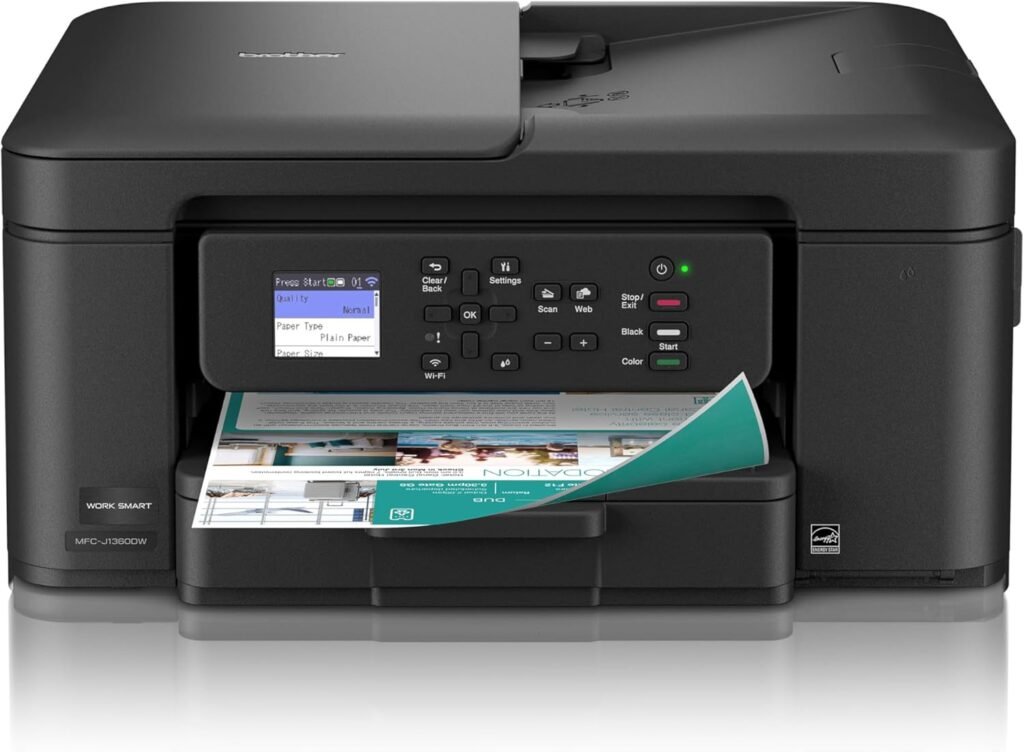
Brother Work Smart 1360 Wireless Color Inkjet Printer
- Automatic duplex (two-sided) printing saves paper on everyday documents
- 20-sheet automatic document feeder (ADF) improves scanning and copying efficiency
- Wireless and mobile printing support for phones, tablets, and laptops
- Compact design with a simple 1.8-inch color display for basic walk-up control
- Reliable text quality and consistent color output for home and small office use
- No touchscreen; navigation relies on physical buttons
- Ink cartridges cost more per page than ink-tank printers
- Photo quality is adequate but not intended for high-end photo printing
- Print speeds are fine for home use but slower than office-class printers
We selected the Brother Work Smart 1360 because it delivers a strong set of everyday features in a compact, user-friendly package that suits both home users and small home offices. Its combination of automatic duplex printing and a 20-sheet automatic document feeder (ADF) sets it apart from many other budget all-in-one inkjets, enabling more efficient handling of multi-page documents without requiring manual page flipping or scanning one sheet at a time.
The inclusion of a 1.8-inch color display makes basic setup and walk-up operation easier, and broad wireless and mobile printing support ensures compatibility with a range of devices, including laptops, smartphones, and tablets. Using Brother LC501 series inks with support for the Refresh subscription also helps simplify ink management for regular users. Overall, the Work Smart 1360 struck the right balance of features, ease of use, and everyday performance for users who want more than the bare minimum from a home all-in-one printer.
The Brother Work Smart 1360 makes the most sense for people who print and scan documents regularly but don’t need an office-class printer. If your day-to-day work includes homework packets, forms, invoices, school projects, or basic business paperwork, this printer covers those needs without complication. Wireless and mobile printing make it easy to print from a phone or laptop, and the automatic document feeder is a real time-saver when dealing with multi-page scans or copies.
That said, it’s not the right choice for everyone. If you print large volumes every week, want professional-quality photos, or are primarily focused on minimizing ink costs, a laser printer or an ink-tank model will likely be a better long-term investment. The Work Smart 1360 is best viewed as a practical, everyday document printer rather than a heavy-duty or photo-focused solution.
-
All-in-One Functionality: Prints, scans, and copies in one compact unit, ideal for home and home office use.
-
Automatic Duplex Printing: Built-in two-sided printing saves paper on everyday jobs.
-
1.8” Color Display: Simple on-device menu navigation and status checks via the color LCD.
-
Wireless & Mobile Printing: Connects over Wi-Fi and works with the Brother Mobile Connect app for printing from smartphones and tablets.
-
Automatic Document Feeder (ADF): 20-sheet single-sided ADF for faster scanning and copying of multi-page documents.
-
Print Speeds: Up to around 16 ppm black and 9 ppm color (typical).
-
Paper Handling: 150-sheet input tray and 50-sheet output capacity.
-
Ink & Subscription: Uses Brother Genuine LC501 series inks and supports Brother’s Refresh subscription for ink reordering.
Design & Build Quality
The Brother Work Smart 1360 favors function over style, with a compact design that fits easily on a desk or small workstation. Its matte black, textured plastic exterior feels sturdy enough for regular home or small office use, even if it lacks any premium visual flair.
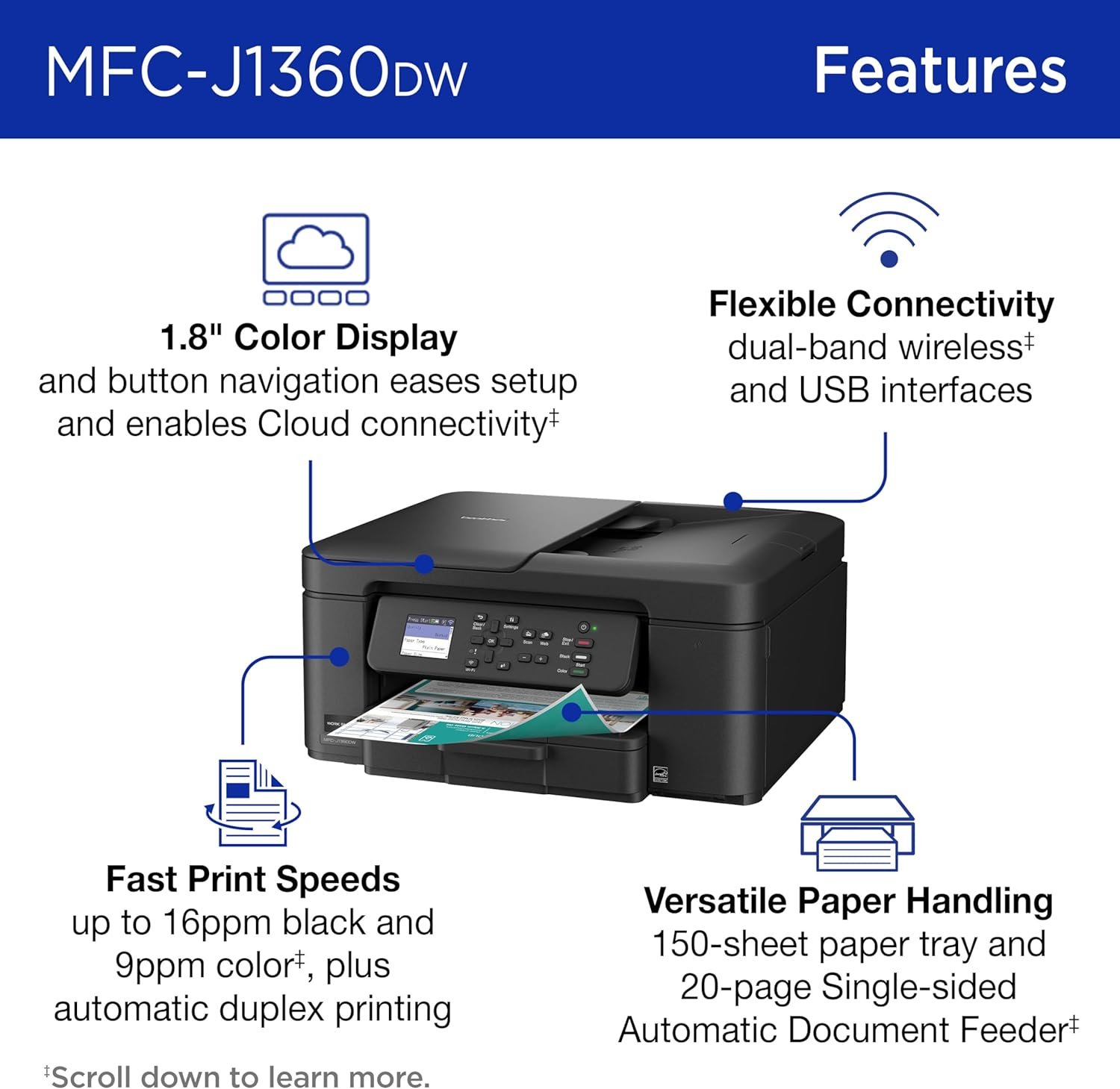
A front-mounted 1.8-inch color display handles basic status checks and menu navigation. It’s small but clear, and responsive enough for tasks like Wi-Fi setup, ink monitoring, and copy settings. Paper trays extend smoothly, and the 20-sheet automatic document feeder is easy to load and feels adequately built for light to moderate use.
Controls are sensibly laid out, and access to ink cartridges, paper paths, and the scanner bed is straightforward. There’s no touchscreen, but the button-based interface keeps operation simple. Overall, the Work Smart 1360 delivers solid build quality and practical ergonomics that align well with its role as a budget-friendly all-in-one.
Setup & Ease of Use
Initial setup is quick and beginner-friendly. Installing the included LC501 ink cartridges and loading paper takes only a few minutes, and the on-screen prompts guide you through each step clearly. Wireless setup can be completed directly from the printer’s display or through the Brother Mobile Connect app, both of which make the process relatively painless.
Once connected, the printer maintains a stable Wi-Fi connection and responds reliably to print jobs from computers and mobile devices. Mobile printing through the Brother app is intuitive, allowing users to handle basic settings and tasks without needing to return to a PC.
The automatic document feeder simplifies multi-page scanning and copying, while the flatbed scanner remains easy to use for single sheets and delicate originals. Overall, the Work Smart 1360 delivers a smooth, low-friction experience that should appeal to users who want a functional all-in-one without a steep learning curve.
Print Quality & Performance
Text printing is where the Work Smart 1360 performs most confidently. On standard plain paper, black text appears dark and well defined, with clean character edges and minimal feathering, even at smaller font sizes around 8–10 points. Multi-page documents such as reports, invoices, and school assignments maintain consistent density from the first page to the last, making it reliable for everyday document work.
In default print mode, single-page black text jobs begin printing quickly, while longer documents print at speeds approaching the rated 16 pages per minute. Complex pages that include mixed text and light graphics slow output slightly, but performance remains steady and predictable. On draft settings, speed increases noticeably, though with lighter ink density.
On higher-quality settings or heavier paper types, such as presentation paper or letterhead, output slows as expected, but text remains sharp and well aligned. Overall, the Work Smart 1360 delivers dependable document-focused performance that favors clarity and consistency over raw speed, aligning well with typical home and small office workloads.
Color & Graphics Output
Color graphics are balanced and consistent for general-purpose use. Charts, presentations, and school projects print with accurate colors and smooth gradients, with minimal banding in default print modes. While it’s not designed for graphics-heavy professional work, output quality is more than sufficient for typical home and student needs.
Photo Printing
Photo prints are serviceable rather than impressive. On photo paper, images show decent color accuracy and contrast, but fine detail and tonal depth fall short of what dedicated photo printers deliver. On plain paper, results are softer, which is expected for a cartridge-based inkjet in this class. For casual snapshots and occasional photo projects, results are acceptable, but serious photo printing is not this model’s focus.
Speed & Duplex Performance
Print speeds are in line with expectations for a home-oriented inkjet. Black-and-white documents print at up to around 16 ppm, while color pages average closer to 9 ppm under standard settings. Simple text documents begin printing with minimal delay, while mixed color pages take longer due to additional ink passes.
Automatic duplex printing works reliably and is useful for longer documents. While two-sided jobs naturally take more time than single-sided prints, the feature helps reduce paper usage and keeps documents neatly organized. Overall speed is consistent and predictable, even if it doesn’t approach office-class laser performance.
Copy & Scan Performance
Copying and scanning performance is dependable for everyday tasks. The 20-sheet ADF handles multi-page documents smoothly, saving time when copying or scanning longer stacks. Output quality for copies remains faithful to the original, with balanced contrast and accurate sizing.
The flatbed scanner performs well for single pages, photos, and small originals, capturing text and images clearly enough for archiving and sharing. While it won’t replace a dedicated high-resolution scanner, it’s more than capable for routine document digitization and home office needs.
Ink & Running Costs
The Work Smart 1360 uses Brother LC501 ink cartridges, which are easy to install and readily available. As with most cartridge-based inkjets, cost per page is higher than what ink-tank or laser printers offer, making long-term expenses a consideration for frequent color printing.
Brother’s Refresh subscription service can help automate ink replacement and reduce downtime, though it doesn’t fundamentally change the cost-per-page equation. For moderate home use — including documents, schoolwork, and occasional color prints — running costs remain reasonable, but high-volume users may find ink expenses add up over time.
Connectivity & Compatibility
Connectivity is a strong suit. The printer supports Wi-Fi for wireless printing and includes a USB option for direct connections. Mobile printing is handled through Brother Mobile Connect, along with support for AirPrint and Mopria, making it easy to print from both iOS and Android devices.
Driver support for Windows and macOS is straightforward, covering the needs of most households and small offices. Overall, connectivity options are well rounded and reliable for a printer in this price range.
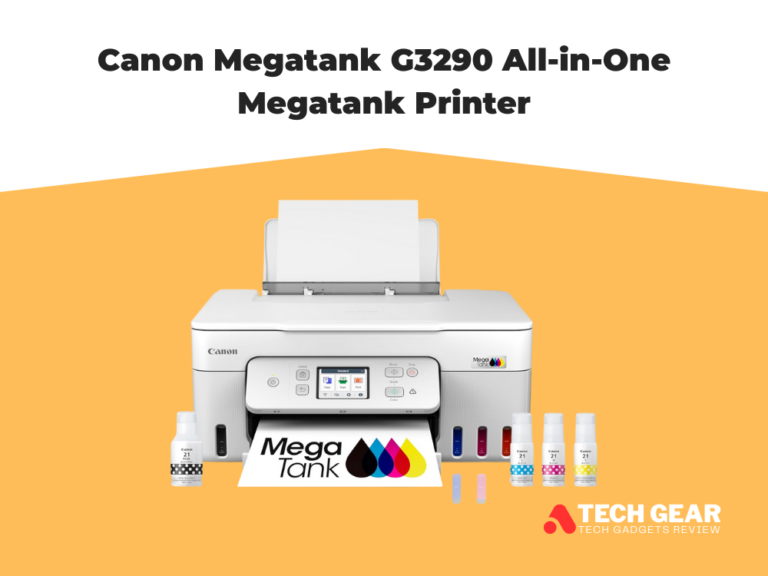
Brother Work Smart 1360 vs Canon MegaTank G3290
The Brother Work Smart 1360 (MFC-J1360DW) and Canon MegaTank PIXMA G3290 target similar home and small office users, but they differ in ink system, workflow features, and long-term running costs, which can shape your choice depending on how you print.
Brother Work Smart 1360
The Brother Work Smart 1360 is a wireless all-in-one inkjet that emphasizes workflow convenience. It includes a 20-sheet automatic document feeder (ADF) and automatic duplex printing, making multi-page scanning and two-sided documents easier without manual handling. Its 1.8-inch color display offers basic on-device control, and print speeds are around 16 ppm black / 9 ppm color — competitive for typical home and small-office tasks. The Brother printer uses individual LC501 ink cartridges, which are easy to replace and integrate with Brother’s Refresh subscription, but the cost per page remains higher than supertank models. Its connectivity includes Wi-Fi, USB, and support for mobile printing through Brother Mobile Connect, AirPrint, and Mopria.
Canon MegaTank G3290
In contrast, the Canon G3290 is built around a supertank ink system with refillable reservoirs, delivering very low long-term ink costs and high page yields per bottle — up to thousands of pages before refilling. It also offers automatic duplex printing and wireless/mobile connectivity, with a larger 2.7-inch touchscreen for more intuitive on-device interaction. Print quality for text, color graphics, and casual photo prints is strong for its class, and overall running costs are significantly lower than cartridge-based printers because of the tank design. However, the G3290 lacks an automatic document feeder, so multi-page scanning and copying require manual placement of each sheet.
| Feature | Brother Work Smart 1360 | Canon MegaTank G3290 |
|---|---|---|
| Printer Type | Wireless All-in-One Inkjet (cartridge) | Wireless All-in-One Supertank Inkjet |
| Ink System | Brother LC501 series cartridges | Refillable MegaTank reservoirs (high yield) |
| Automatic Duplex Printing | Yes (built-in) | Yes (built-in) |
| Automatic Document Feeder (ADF) | 20-sheet ADF | No ADF (flatbed only) |
| Display | 1.8″ color LCD | 2.7″ color touchscreen LCD |
| Print Speed | Up to ~16 ppm (black) / ~9 ppm (color) | About ~11 ipm (black) / ~6 ipm (color)† |
| Rated Page Yield | Starter cartridges ~200 pages each (black/color) | Up to ~6,000 black / ~7,700 color pages per ink set‡ |
| Mobile Printing | Brother Mobile Connect, AirPrint, Mopria | Canon PRINT app, AirPrint, Mopria |
| Wireless Connectivity | Wi-Fi, USB, Wi-Fi Direct | Wi-Fi, USB |
| Scanner | Flatbed + 20-sheet ADF | Flatbed scanner only |
| Best For | Users who want ADF + duplex in a budget inkjet | Users who want very low running costs |
Ready To Buy?: Brother Work Smart 1360 Final Verdict
The Brother Work Smart 1360 (MFC-J1360DW) is a well-balanced wireless all-in-one inkjet aimed squarely at home users, students, and small home offices. It delivers a useful mix of productivity features—automatic duplex printing, a 20-sheet automatic document feeder, and reliable wireless connectivity—without adding unnecessary complexity, which becomes clear throughout this Brother Work Smart 1360 Review.
In everyday use, it produces sharp text and consistent color graphics, while the ADF makes multi-page scanning and copying far more convenient than flatbed-only alternatives. Print speeds of around 16 ppm for black and 9 ppm for color are competitive for its class, and setup and operation remain simple. Running costs are higher than ink-tank printers due to cartridge-based LC501 inks, but support for Brother’s Refresh subscription helps streamline ink management. Photo quality is adequate for casual use, though not intended for photo-centric workflows.
Ultimately, if you’re looking for a compact, feature-rich all-in-one that prioritizes document handling and ease of use over ultra-low ink costs, the Work Smart 1360 is a solid choice. As highlighted in this Brother Work Smart 1360 Review, it stands out as a dependable mid-range inkjet that fits the needs of modern homes and small workspaces without overreaching.