What is DTF Printing: A Beginner’s Guide to Direct-to-Film Technology
DTF printing — short for Direct-to-Film printing — is a modern textile printing technology that allows you to print full-color designs onto a special PET film and transfer them to fabric using heat. Unlike older methods that require pretreatment, multiple screens, or fabric restrictions, DTF gives creators the freedom to print on cotton, polyester, blends, canvas, leather, fleece, denim, and many specialty fabrics with consistent results. This flexibility is one of the reasons DTF printing has become a game-changer for small businesses, home-based creators, and growing apparel brands.
Over the past few years, demand for on-demand custom apparel has surged, and DTF Printing has quickly become one of the most preferred methods due to its durability, color vibrancy, lower learning curve, and cost efficiency. For beginners who want to start a home based or small printing business or add a new service to an existing studio, DTF offers a practical, scalable, and beginner-friendly way to produce professional-quality transfers without investing in complex equipment. Read our article on this topic Starting a Home-Based T-Shirt and Cap Printing Business (2025 Guide)
Why DTF Printing Is Becoming Popular
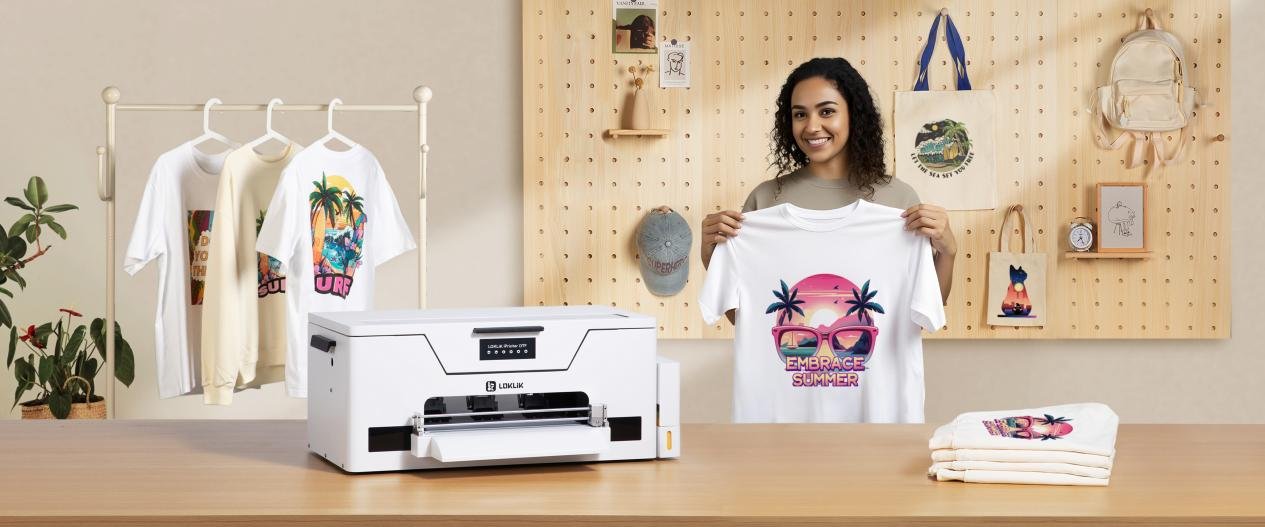
DTF printing has disrupted the custom apparel industry because it removes many of the limitations creators faced with DTG, sublimation, vinyl, and traditional screen printing. Instead of forcing you to choose fabrics carefully, pretreat garments, or create screens, DTF uses a simple film-to-fabric transfer process that works with almost any textile. This makes it ideal for small merchandise brands, print-on-demand businesses, uniform shops, and home creators who need a single solution that can handle multiple product types.
How DTF Printing Works (Step-by-Step)
DTF printing follows a simple but highly effective workflow that ensures your design transfers cleanly and permanently to the fabric. The entire process revolves around printing your artwork onto a PET transfer film, applying a hot-melt adhesive powder, curing it, and then pressing it onto the garment. Even though the technology is advanced, the actual steps are easy for beginners to learn and master without needing expensive pretreatment equipment or complicated setups.
May You Like: 3 Best DTF Printers 2025 In-Depth ReviewsFor small printing businesses, creators, or anyone starting from home, the DTF workflow is one of the most time-efficient methods available. Once you become familiar with the process, you can produce dozens of transfers within minutes and apply them when needed. The ability to print now and press later gives you better inventory control and makes your workflow more flexible and scalable.
1. Create or Import Your Design
The process begins with preparing your artwork in design software such as Photoshop, Illustrator, CorelDRAW, or Canva. For best results, use a high-resolution PNG, SVG, or vector file. After finalizing your artwork, you will load it into RIP software, which controls color layers, white ink underbase, ink density, and print settings.
2. Print the Design on PET Film
Once the file is ready, the DTF printer prints the design onto a matte-coated PET film in two layers: first the colored layer and then a white ink layer on top. The white layer acts as the foundation that allows the design to transfer cleanly to both dark and light fabrics. This step is completely automated by the printer and software.
3. Apply Hot-Melt Powder
Right after printing, a hot-melt adhesive powder is spread evenly across the printed area. This powder sticks only to the wet ink. You can apply the powder by hand or use an automatic powder shaker for faster production. The quality and evenness of this powder layer directly affect the durability and washability of your final print.
4. Cure or Melt the Adhesive Powder
The powdered film is then placed in a curing oven or under a heat press (without closing it completely). The goal is to melt the adhesive powder until it becomes glossy and bonded with the ink. This step prepares the transfer for pressing and ensures the design sticks firmly to the fabric during application.
5. Heat Press the Design onto the Fabric
Now the printed and cured film is ready for application. Place the film design-side down on your garment and press it using a heat press at the recommended temperature and time settings (usually around 150–165°C for 10–20 seconds, depending on film type). The heat activates the adhesive and binds the design to the fabric.
6. Peel the Film (Hot Peel or Cold Peel)
After pressing, the film is peeled away to reveal the final print. Some films require a cold peel for best results, while others support hot peel for quicker production. The peel type depends on the brand of PET film you are using.
7. Final Press for Durability
To lock in the colors and ensure long-lasting washability, many creators perform a quick final press for 5–10 seconds after peeling the film. This improves the finish, softens the print feel, and enhances durability against stretching and repeated washing.
Required Equipment for DTF Printing (and Starting Setup Options)
DTF printing demands a specific set of tools and materials to ensure the final result is vibrant, durable, and professional-quality. Especially if you’re starting a home-based apparel printing business, having the right gear from the beginning saves you time, money and avoids trial-and-error frustrations down the road.
However, for some beginners — especially those working with simpler product lines — it’s worth considering alternative methods such as sublimation printing, which requires slightly different equipment and may offer a lower barrier to entry depending on your needs. Below is the gear breakdown for both approaches, along with guidance on which route suits different business goals.
Core DTF Equipment Setup / DTF Printer (with White-Ink Capability)
To do true DTF you need a specialized printer that supports CMYK + white ink printing and works with PET film. The white ink layer acts as the underbase that ensures designs show up vividly even on dark fabrics. Entry-level DTF printers are ideal for small batches, while more advanced units suit growing home-based businesses.
Matte-Coated PET Transfer Film
This is the “canvas” for your print. It is a special PET film coated to accept pigment inks and hold the adhesive powder. Use high-quality, matte-coated PET film to avoid issues like smudging, poor adhesion, or poor wash durability.
Hot-Melt Adhesive Powder
Immediately after printing, a hot-melt adhesive powder is applied to the wet ink. This powder bonds the design to the fabric during heat pressing. Uniform application and proper powder quality are essential — too little yields weak adhesion; too much can create rough or uneven prints.
Powder Shaker / Applicator
To apply adhesive powder evenly and efficiently, a manual or automatic powder shaker is used. For small home businesses, a simple manual shaker may suffice; for larger output or multiple prints per day, an automatic shaker speeds up the process and reduces waste.
Curing Oven or Heat-Gun / Pre-Cure Setup
After powder application, the film needs to be cured (i.e. melted) so the powder bonds to the ink. A compact curing oven or heat-gun station is useful for small batches. Proper curing improves transfer quality and ensures the adhesive bonds firmly.
Heat Press Machine
A heat press is the core tool that transfers your design from film to fabric. For small businesses, a daily-use heat press — preferably with adjustable temperature, pressure and timing — is recommended. It should support typical apparel sizes (T-shirts, hoodies, bags) and allow consistent pressure across the print area.
RIP / Printing Software
Rather than sending straight-to-printer from generic apps, DTF printing benefits from RIP (Raster Image Processor) software, which controls ink layers, white underbase, color management, and print resolution. RIP software enables better color accuracy and layer control — especially important for multi-color designs or white-ink printing.
Maintenance Supplies & Cleaning Tools
DTF printing involves pigment inks and adhesive powders — both of which can clog printheads or cause buildup. Having cleaning kits, spare capping caps/printheads, flush solutions, replacement nozzles, and basic maintenance tools will prolong the printer’s life. Also, ensure proper ventilation if you work with powders.
- Optional But Recommended Add-ons for Small Home Studios
- Extra bottles of white + CMYK inks — to avoid downtime during peak production
- Additional rolls or sheets of PET film — avoid running out mid-order
- Protective mats or Teflon sheets — useful for pressing delicate garments or preventing adhesion on your press platen
- Ventilation mask or air filter — advisable if you use adhesive powders regularly
- A pre-press station — helpful to pre-flatten garments before printing for better alignment and pressing
Sublimation Printing — A Simpler Alternative for Some Startups
If your initial aim is low-cost startup, small runs, or you focus on light-colored polyester garments or rigid substrates (like mugs, phone cases), sublimation printing can be a viable entry point. Here’s what you’d need:
-
A sublimation printer (often using modified inkjet printers with sublimation inks)
-
Sublimation inks (CMYK only — no white ink needed)
-
Sublimation transfer paper
-
A heat press (or specialized mug/photo press for other items)
-
Polyester garments or polyester-coated substrates (sublimation works best on polyester or polymer-coated surfaces)
Pros of sublimation for beginners:
-
Lower initial cost compared to DTF (no adhesive powders, no PET film)
-
Easy workflow: design → print → press
-
No need for white underbase or powder handling
-
Soft, embedded prints (ink becomes part of the fabric rather than sitting on top)
Cons / Limitations:
-
Works best only on polyester or coated substrates — not ideal for cotton, dark fabrics, canvas, leather, etc.
-
Not suitable for designs intended for dark garments (colors will be washed out)
-
Prints are less textured — some customers may prefer the “print-on-top” feel DTF gives
Which Setup Is Best for You: DTF or Sublimation?
-
Choose DTF if you plan to offer a wide variety of garments (cotton, blends, dark fabrics), want long-lasting, vibrant, durable prints, and expect small- to medium-volume orders. DTF gives flexibility and supports most fabric types.
-
Choose Sublimation if you’re starting small, working mostly with polyester garments or specific coated items (mugs, phone cases, etc.), want minimal setup costs, and are okay with the fabric/color limitations.
For many home-based apparel printing startups, a hybrid approach also works — start with sublimation for low-cost items and simple products, then gradually invest in DTF gear as your orders grow or diversify. That way you manage costs while testing product-market fit.
Common Mistakes & Troubleshooting
Many beginners face similar challenges when starting with DTF printing, and understanding these issues early can save time, materials, and frustration. One of the most common problems is poor wash durability, which often happens when the adhesive powder is applied unevenly or in insufficient amounts. Too little powder leads to weak bonding, while too much creates rough textures or causes the print to crack after washing. Ensuring the powder is evenly distributed and fully melted during curing significantly improves long-term durability.
Another frequent issue is print banding or clogged nozzles, typically caused by irregular printer maintenance or dried white ink. White ink is heavier than CMYK and can settle quickly, so regular agitation, nozzle checks, and scheduled cleanings are essential for keeping print quality consistent. Beginners may also struggle with overcuring or undercuring the adhesive powder. Undercuring makes the powder grainy and prevents strong adhesion, while overcuring causes the adhesive to burn or become brittle. Both mistakes lead to peeling during or after pressing. Proper temperature control and learning to recognize the glossy, fully melted finish help avoid these problems.
Another mistake is pressing at the wrong temperature, pressure, or time, which can cause muted colors, incomplete transfers, or visible film residue. Using a reliable heat press and verifying settings for each film type prevent most of these issues. Additionally, some users accidentally choose the wrong peel method—hot peel vs. cold peel—which leads to smudging or incomplete designs.
Always check the manufacturer’s instructions for the type of PET film you’re using. Lastly, environmental factors such as humidity and poor ventilation can affect curing and powder behavior. Too much humidity can cause powder to clump, while lack of airflow may lead to fumes building up during curing. Keeping the workspace clean, ventilated, and dry helps maintain consistent results. By understanding these common pitfalls and applying proper troubleshooting techniques, creators can achieve reliable, professional-quality DTF prints every time.
Conclusion
DTF printing has rapidly become one of the most versatile and accessible methods for creators, small businesses, and home-based apparel entrepreneurs who want to produce high-quality, durable designs across a wide range of fabrics. Its ability to deliver vibrant colors, strong wash resistance, and compatibility with cotton, blends, polyester, and specialty materials makes it a standout solution compared to traditional methods like DTG, vinyl, or sublimation. While the workflow involves several steps—printing, powdering, curing, and pressing—the process is straightforward once mastered, and it offers a scalable path for both beginners and experienced printers.
For those just starting out, sublimation remains an excellent low-cost alternative, especially for polyester garments and rigid items like mugs or phone cases. However, the fabric limitations and inability to print on dark textiles mean it cannot fully replace the versatility of DTF. Many new businesses successfully adopt a hybrid approach: beginning with sublimation for affordability, then expanding into DTF as they grow or seek to offer more diverse product options.
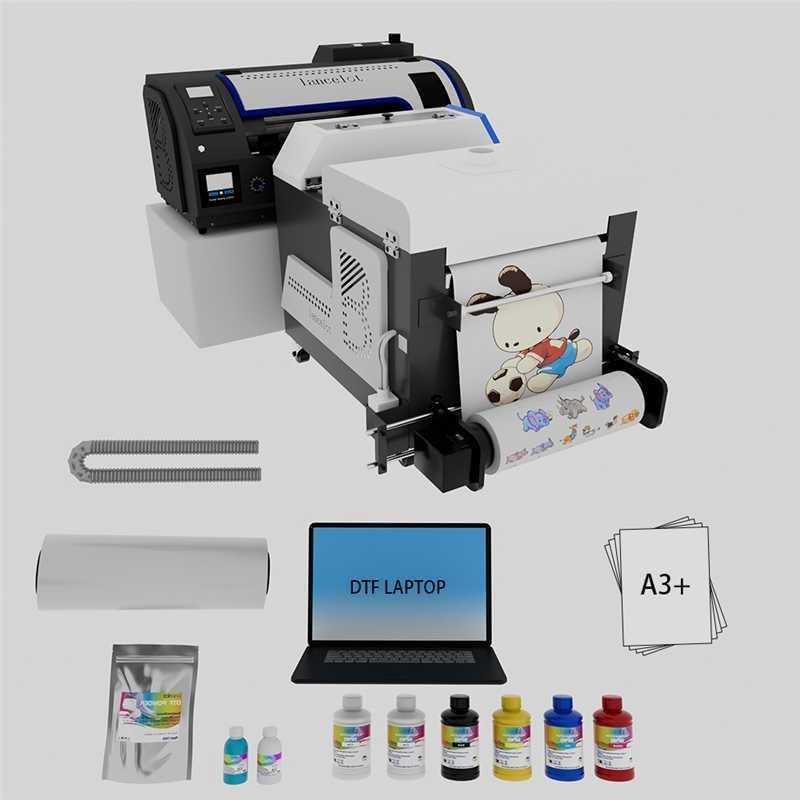
- 2× faster printing with improved film-handling efficiency
- Automatic powder shaking and curing included in the bundle
- Smart white-ink circulation reduces clogging issues
- Supports roll and sheet PET film for all production types
- Suitable for shirts, hoodies, tote bags, and mixed fabrics
- Great for small businesses and higher-volume home setups
- Higher upfront cost compared to basic DTF setups
- Larger footprint due to shaker and curing unit
- Requires routine maintenance for white ink stability
- Learning curve for RIP software for first-time users
| Printing Speed | Up to 2× faster vs standard A3 DTF units |
| Ink System | Smart white-ink circulation + CMYK |
| Curing Method | Auto-curing with heater & powder shaker |
| Media Support | PET rolls or sheets (A3 format) |
| Best For | Shirts, hoodies, bags, caps, mixed fabrics |
| Maintenance | Auto-cleaning mode with nozzle protection |
Why DTF Printers Are the Best Choice for Starting a Home-Based Apparel Printing Business
DTF printers have quickly become one of the most preferred options for home-based apparel businesses because they offer unmatched fabric versatility and professional results without the limitations of sublimation. Unlike sublimation printers, which only work well on light-colored polyester, DTF printing allows beginners to create vibrant, durable designs on cotton, polyester, blends, fleece, denim, canvas, and dark garments right from day one. This flexibility is extremely valuable for new entrepreneurs who want to offer a wider product catalog without being restricted by fabric type or color.
2. Long-Lasting Prints That Customers Trust
Another major advantage of DTF printing is its long-lasting, high-quality finish. Because DTF designs sit on the fabric with a strong adhesive bond, the prints remain vibrant and resistant to cracking, fading, or peeling even after many wash cycles. This makes DTF ideal for custom T-shirts, hoodies, sweatshirts, caps, and tote bags—products small businesses often sell the most. For home-based startups looking to deliver professional-grade results that meet customer expectations, DTF offers premium print quality without requiring pretreatment or complex workflows.
3. Perfect for Dark Garments and High-Demand Apparel
DTF printing also opens the door to high-value, dark-colored apparel products that sublimation cannot handle. Most customers prefer dark shirts—especially black—and DTF handles them effortlessly with its white-ink underbase. This allows home-based businesses to serve a much larger audience and attract more orders across eCommerce platforms like Etsy, Shopify, and Amazon Handmade. The ability to print now and press later also means you can build a backlog of ready-to-use transfers, making order fulfillment faster and more organized.
4. A Better Long-Term Investment for Small Businesses
Although sublimation has lower startup costs, DTF provides a much clearer path for long-term business growth thanks to its broader material compatibility and higher selling potential. Modern DTF bundles—like the Lancelot M1630 Pro—come with automatic powder shaking, curing, and white-ink circulation, making the entire process easier than ever for beginners. For entrepreneurs aiming to build a profitable, scalable home apparel brand, DTF printers offer the best balance of versatility, durability, and business opportunity.