


The Phomemo Label Maker is a compact Bluetooth label printer made for users who want quick, clean, and ink-free labels for home, office, school, storage, craft projects, and small business organization. The popular Phomemo D30 model uses direct thermal printing, offers 203 DPI output, connects through the Print Master mobile app, and is small enough to carry around for everyday labeling tasks. It is useful for pantry jars, file folders, notebooks, cables, storage boxes, price tags, classroom supplies, and product labels, making it a practical choice for simple organization in this Phomemo Label Maker Review.
Instead of using a built-in keyboard like older label makers, the Phomemo D30 lets you design labels from your phone with text, symbols, frames, icons, barcodes, QR codes, and ready-made templates. It prints in monochrome black text on compatible thermal label tapes, so it does not require ink, toner, or ribbons. It is not made for large shipping labels or full-color printing, but for small custom labels, it offers a simple and portable experience.
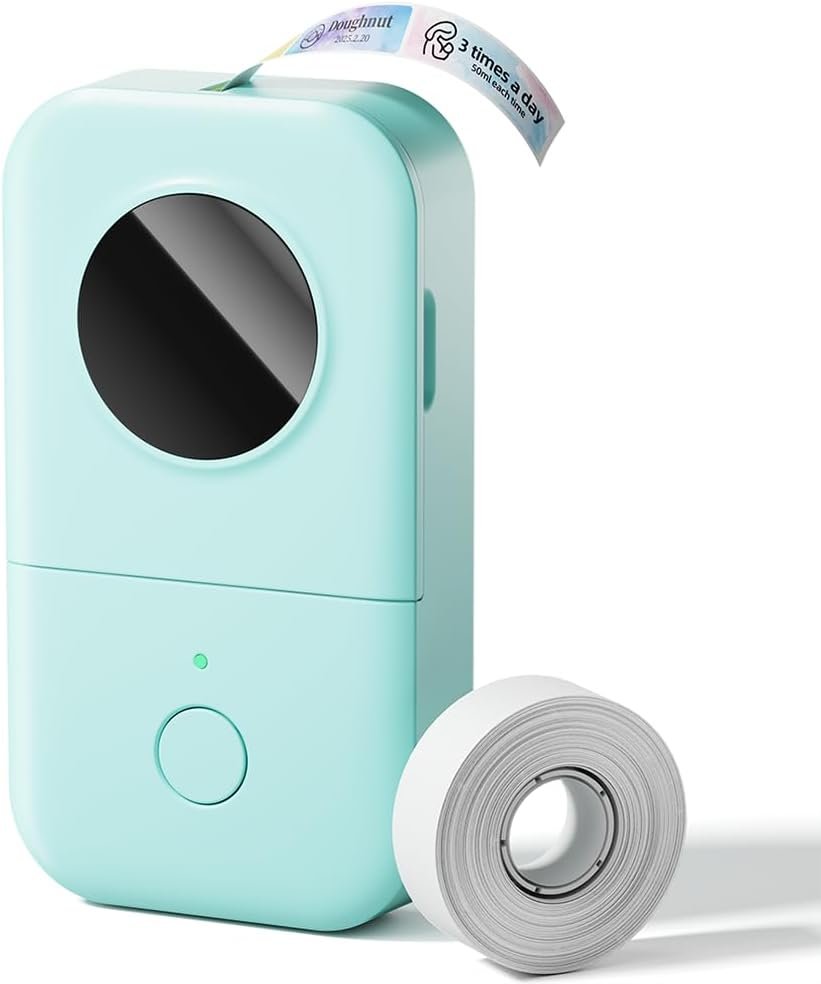
- Compact and lightweight design for portable use
- Direct thermal printing means no ink, toner, or ribbons
- 203 DPI print quality is clear for small labels
- Bluetooth app printing works with supported iOS and Android devices
- Useful design tools for text, icons, barcodes, QR codes, and templates
- Good for home organization, office labels, school supplies, and small tags
- Rechargeable design makes it easier to use anywhere
- Prints in black only, not full color
- Requires the mobile app for label design and printing
- Not suitable for large 4×6 shipping labels
- Limited label size compared with bigger desktop label printers
- App-based workflow may not suit users who want a built-in keyboard
The Phomemo Label Maker stands out because it is small, easy to carry, and simple enough for everyday labeling. It does not need ink or toner, and the mobile app gives more design flexibility than many old-style label makers with tiny keyboards.
What we like most is its convenience. You can keep it in a drawer, connect it to your phone, design a label in the app, and print a clean label within minutes. For home organization, school supplies, file labels, pantry jars, and small business tags, it is a practical tool.
The Phomemo Label Maker is best for parents, students, teachers, office users, home organizers, crafters, and small business owners who need small custom labels. It works well for labeling jars, boxes, notebooks, folders, shelves, cables, drawers, containers, classroom items, and product tags.
It is not the best choice for large shipping labels, industrial labels, or users who want color printing. But for daily organization and small labels, it offers strong value.
- Model Type: Portable Bluetooth label maker
- Popular Model: Phomemo D30
- Printing Technology: Direct thermal printing
- Ink Requirement: No ink, toner, or ribbons required
- Print Resolution: 203 DPI
- Print Output: Monochrome black printing
- Connectivity: Bluetooth app printing
- App Support: Print Master app
- Compatibility: Supported iOS and Android phones and tablets
- Design Tools: Text, symbols, frames, icons, barcodes, QR codes, and templates
- Power: Built-in rechargeable battery
- Portability: Small and lightweight body for everyday use
- Best Use Case: Home labels, office labels, school labels, storage labels, and small business tags
Phomemo Label Maker Review: Design and Portability
The Phomemo Label Maker has a small and lightweight design, which makes it easy to carry around the house, office, classroom, or craft room. It is much smaller than a desktop printer and easier to store than many traditional label makers.
This portable design is one of the main reasons people choose the Phomemo D30. You can keep it in a drawer, backpack, desk organizer, or small storage box and use it whenever you need a quick label.
Setup and Bluetooth Connection
The Phomemo Label Maker connects to your phone or tablet through Bluetooth. After installing the Print Master app, you can pair the printer, select a label style, design your label, and print directly from your mobile device.
The setup is beginner-friendly, but it is app-based. That means users who prefer a standalone label maker with a physical keyboard may need some time to adjust. For most users, designing from a phone is easier because the screen is larger and the editing tools are more flexible.
Print Master App Experience
The Print Master app is the main control center for the Phomemo Label Maker. It lets you create labels with text, symbols, borders, icons, QR codes, barcodes, and templates. This makes it useful for both simple labels and more creative label designs.
You can create name labels, file labels, pantry labels, storage tags, school labels, reminder labels, and small product tags. The app is not professional desktop design software, but it gives enough options for everyday label making.
Print Quality
The Phomemo Label Maker uses 203 DPI direct thermal printing. For small labels, this is clear enough for text, numbers, icons, barcodes, and QR codes. Labels are readable and neat when used for files, jars, cables, boxes, drawers, and classroom supplies.
Since it is a thermal label maker, it prints in black only. You can use different label tape styles or colours depending on the compatible tape you buy, but the printed content itself remains monochrome. If you need full-colour labels, this is not the right printer.
Ink-Free Thermal Printing
One of the biggest advantages of the Phomemo Label Maker is that it does not use ink, toner, or ribbons. It prints on thermal label paper, which helps keep maintenance simple and reduces the need for extra supplies.
This makes it convenient for home and office users because you only need compatible label tapes. There are no ink cartridges to dry out, replace, or store.
Label Uses and Everyday Performance
The Phomemo Label Maker is useful for many everyday tasks. At home, it can help label pantry jars, spice containers, food storage, clothing drawers, cosmetics, cables, and storage boxes. In an office, it can be used for folders, shelves, notebooks, reminder labels, price tags, and small equipment labels.
Teachers and students can also use it for name tags, classroom supplies, notebooks, folders, and item identification. For small business users, it can help create product tags, category labels, pricing labels, and simple inventory labels.
Battery and Charging
The Phomemo Label Maker uses a rechargeable battery, which makes it easier to use without buying disposable batteries. For occasional label printing, the rechargeable design is convenient and helps keep the device ready for quick tasks.
Battery life depends on how many labels you print, how often you use the printer, and how long it stays connected. For normal home and office use, it should be enough for regular small labeling jobs.
Phomemo Label Maker vs Nelko Label Maker
The Phomemo Label Maker and Nelko Label Maker are both compact Bluetooth thermal label printers. Both are good for home, office, school, and small organization labels. Both also use app-based label design and do not require ink or toner.
The main difference comes down to app experience, label tape availability, design templates, and personal preference. Phomemo’s Print Master app offers plenty of tools for creative labels, while Nelko is also popular for simple home organization. If you already like Phomemo’s label tape options and app style, the Phomemo Label Maker is a strong choice.
Phomemo Label Maker vs Traditional Label Maker
A traditional label maker usually has a small screen and built-in keyboard. That can be useful if you want to print without using your phone. However, the small keyboard can feel slow, and design options are usually limited.
The Phomemo Label Maker is better if you want to create labels from your phone with more fonts, symbols, frames, and templates. The trade-off is that you need the app whenever you want to design and print labels.
Phomemo Label Maker vs Shipping Label Printer
The Phomemo Label Maker is not a replacement for a shipping label printer. It is designed for small labels, organization labels, tags, and simple item identification.
If you need 4×6 shipping labels for Amazon, eBay, Etsy, Shopify, USPS, UPS, or FedEx, you should buy a dedicated thermal shipping label printer. But if you need small labels for jars, folders, boxes, cables, and supplies, the Phomemo Label Maker is more compact and easier to use.
Who Should Buy the Phomemo Label Maker?
- Home users who want labels for jars, drawers, bins, and containers
- Office users who need file labels, shelf labels, and reminder labels
- Students who want labels for notebooks, folders, and supplies
- Teachers who need classroom labels and name tags
- Crafters who want small labels for supplies and projects
- Small business users who need simple tags and organization labels
- Buyers who want a portable, ink-free Bluetooth label maker
Who Should Skip It?
- Users who need full-colour label printing
- People who need large 4×6 shipping labels
- Buyers who want a label maker with a built-in keyboard
- Users who need industrial-grade label printing
- People who do not want to use a phone app for printing
Final Verdict
The Phomemo Label Maker is a practical choice for users who want a compact, Bluetooth, ink-free label printer for small everyday labels. It is easy to carry, simple to use, and flexible enough for home organization, office work, school supplies, craft projects, and small business labels.
It prints only in black, depends on the mobile app, and is not suitable for large shipping labels. But for users who mainly need small labels for organization and identification, it offers strong everyday value.
As this Phomemo Label Maker Review shows, if you want a portable label maker with Bluetooth app control, clear thermal printing, and useful design options, the Phomemo Label Maker is easy to recommend.