Kyocera ECOSYS M5526cdw Review (2026)
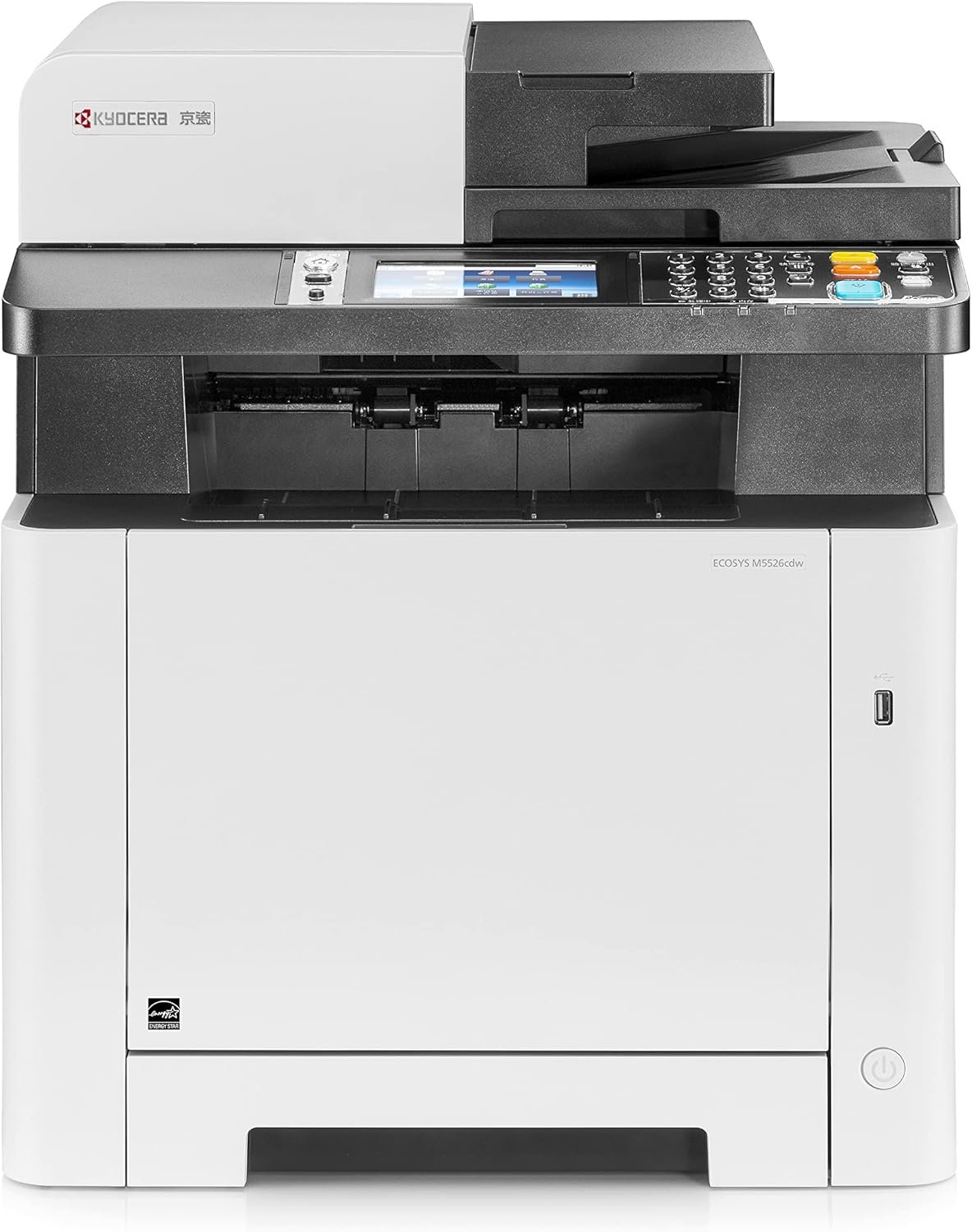
The Kyocera ECOSYS M5526cdw All-In-One Printer is a business-class all-in-one color laser printer built for shared office and department use, not casual home printing. In this Kyocera M5526cdw Printer review, we’re looking at a 4-in-1 printer that covers the full daily document cycle—printing, scanning, copying, and faxing—while keeping the core productivity features offices actually need. An automatic duplex printing, a dual-scan document processor with a 50-sheet ADF for fast multi-page jobs, and a 250-sheet main tray that supports consistent team workloads. Speed is rated in the 26 ppm class for both black and color, so routine reports, invoices, and color office pages move at a steady business pace, and the print engine is tuned for crisp text and clean charts rather than photo-grade output.
What makes the Kyocera ECOSYS M5526cdw Printer stand out in 2026 is Kyocera’s ECOSYS approach to long-term ownership. The platform uses long-life imaging components and high-yield toner (TK-5242 series) to keep running costs predictable for teams that print every day, which is a key advantage in the color-laser category where operating cost can easily outpace the hardware price. Add in full office connectivity—Wi-Fi, Wi-Fi Direct for quick device pairing, and Gigabit Ethernet for stable shared networking—plus walk-up controls on a 4.3-inch touchscreen, and you get a printer designed to sit in a real office corner and handle mixed department volume without constant attention.
Kyocera M5526cdw Review | Best All-in-One Color Laser Printer
-
True business all-in-one: print, scan, copy, and fax in one unit, so it supports complete office document workflows without extra hardware.
-
Steady workgroup speed: delivers about 26 ppm in both black and color, keeping daily reports, invoices, and mixed office jobs moving at a reliable department pace.
-
Automatic duplex + 50-sheet ADF: built for multipage scanning/copying and two-sided printing, reducing manual handling and saving time for shared teams.
-
Low long-term ownership cost: Kyocera’s ECOSYS long-life engine and high-yield toner design keep cost per page predictable, which is a major advantage in color laser use.
-
Full office networking: Wi-Fi, Wi-Fi Direct, and Gigabit Ethernet make it easy to share across departments and connect multiple users smoothly.
-
Not an enterprise production unit: paper capacity and expansion options are aimed at workgroups, not high-volume fleet or production printing environments.
-
Scan side is practical, not premium: scanning is solid for documents, but it doesn’t feel as fast or advanced as high-end office MFPs.
-
Office color only: great for charts, presentations, and business graphics, but not designed for photo-grade color accuracy or creative printing.
We picked the Kyocera ECOSYS M5526cdw because it hits the exact balance workgroups care about in 2026. A dependable color laser performance, full 4-in-1 office printing functionality, and lower long-term running cost than most printers in its speed class. It’s fast enough for shared department use at around 26 ppm in both black and color, supports automatic duplex printing to cut paper waste, and includes a 50-sheet ADF that makes multi-page scanning and copying a real productivity feature instead of a slow add-on. What really seals it is Kyocera’s ECOSYS design philosophy — long-life imaging parts and high-yield toner keep ownership cost predictable for teams that print every day. If you want a business-ready color MFP that can sit in an office corner, serve multiple users, and stay economical over time, the Kyocera ECOSYS M5526cdw Printer makes a strong case.
The Kyocera ECOSYS M5526cdw is best for shared office workgroups and department settings that print a steady mix of black-and-white and color documents every day. It fits teams in admin departments, schools, clinics, agencies, law/accounting offices, and growing businesses that rely on fast, consistent output for reports, invoices, proposals, presentations, and color charts. If your workflow also includes routine scanning, copying, or faxing of multi-page paperwork, the ADF and duplex features make it a practical “walk-up” office printer rather than a single-user printer.
It’s not the right choice for casual home users, photo printing, or creative studios that need high-end color accuracy. And while it handles real workgroup volume well, very large enterprises that need heavy finishing options, ultra-high monthly throughput, or big expandable tray stacks may want a higher-tier fleet or production model. For typical department workloads where reliability, full MFP features, and controlled long-term cost matter most, the Kyocera ECOSYS M5526cdw Printer is exactly in its comfort zone.
| Feature | Specification |
|---|---|
| Model | Kyocera ECOSYS M5526cdw |
| Printer Type | A4 Color Laser Multifunction (Print / Copy / Scan / Fax) |
| Print Speed (Mono/Color) | Up to 26 / 26 ppm (A4) |
| First Print Out Time | Approx. 9.5 sec (mono) / 10.5 sec (color) |
| Print Resolution | 600 × 600 dpi; up to 1200 × 1200 dpi (fine mode) |
| Duplex Printing | Yes, automatic two-sided printing (A5R–A4/Legal) |
| Scanner Type | Flatbed + One-path Duplex ADF |
| ADF Capacity | 50 sheets |
| Scan Speed (300 dpi) | Simplex: up to 30 ipm (mono) / 23 ipm (color); Duplex: up to 24 / 16 ipm |
| Copy Resolution | 600 × 600 dpi |
| Warm-Up Time | Approx. 29 seconds |
| Paper Input (Standard) | 250-sheet cassette + 50-sheet multipurpose tray |
| Paper Input (Maximum) | Up to 550 sheets (with optional 250-sheet tray) |
| Output Capacity | Up to 150 sheets (face-down) |
| Supported Paper Sizes | A6R to A4 / Legal, envelopes, custom sizes |
| Supported Paper Weights | Cassette: 60–163 g/m²; MPT: 60–220 g/m² |
| Control Panel | 4.3″ Color Touch LCD |
| Processor / Memory | 800 MHz CPU; 512 MB RAM standard (up to 1.5 GB max) |
| Connectivity | Wi-Fi (802.11 b/g/n) + Wi-Fi Direct, Gigabit Ethernet, USB 2.0, USB Host |
| Mobile Printing | AirPrint, Mopria, Kyocera Mobile Print |
| Dimensions (W × D × H) | 417 × 429 × 495 mm |
| Weight | Approx. 26 kg |
| Power Use (Print/Copy) | Approx. 375 W |
Design & Build Quality
The Kyocera ECOSYS M5526cdw has the kind of physical build you expect from a workgroup color laser MFP. A solid, functional, and clearly engineered for daily shared use rather than lightweight office duty. The chassis is sturdy with tight panel gaps, a stable base, and a balanced top section that doesn’t feel wobbly even when the ADF lid is raised. Its footprint is desk-friendly for an office corner, but at roughly 26 kg it’s definitely a “set it once and leave it there” machine. The matte plastic exterior is practical (resists fingerprints and scuffs), while the internal frame and laser engine give it that heavier, office-grade feel that helps it stay planted during long duplex runs.
Up top, the flatbed scanner and one-pass duplex ADF are integrated cleanly into the design, built for routine multi-page batches like contracts, invoices, and admin paperwork. The 50-sheet ADF feeds securely without feeling top-heavy, and the scanner lid opens wide enough for books or bound originals. Paper handling follows a workgroup layout: a 250-sheet main tray for everyday A4/Letter jobs plus a 50-sheet multipurpose tray for thicker media or quick one-offs, and the duplex path is aligned to keep pages tracking straight. The 4.3-inch color touchscreen is simple but effective for walk-up copying, scanning, and fax tasks, making the whole unit feel designed around real office workflows rather than flashy styling.
Setup & Ease of Use Kyocera ECOSYS M5526cdw Printer
The Kyocera ECOSYS M5526cdw is straightforward to set up for a business-class color laser, and most of the process can be finished directly from the printer without needing IT-level skills. After unboxing, you install the four toners, remove the transport locks, load paper into the main tray, and power on. The first-boot wizard walks you through language, region, date/time, and connection type on the touchscreen, so even basic office users can complete setup without guessing. In a typical office environment, you’re looking at a smooth “unbox to first print” experience that feels predictable and professional, not messy or consumer-grade.
Touchscreen & Walk-Up Controls
The 4.3-inch color touchscreen is built for quick office tasks. Menus are laid out in a clean, task-first way: copy, scan, fax, duplex settings, paper type, and network tools are all easy to find without digging through confusing layers. The screen response is solid and the icons are large enough for shared use, so staff can walk up, scan a batch, or run copies without asking the admin every time. For departments where multiple people touch the printer daily, this kind of simple panel design matters.
Network Setup (Wi-Fi vs. Ethernet)
For shared teams, Ethernet setup is the fastest and most stable route: plug into LAN, let the printer grab an IP, and it’s ready for multiple PCs. Wi-Fi setup is also smooth, with the printer detecting nearby networks quickly and staying stable once connected. Wi-Fi Direct is useful for quick device-to-printer pairing when you don’t want to join a full network, especially in meeting rooms or temporary office layouts. Once added to the network, both Windows and macOS machines detect it reliably, and adding new users is a normal “find printer → install driver” flow. Windows 10/11 automatically detects and installs compatible drivers when you connect the printer.
Daily Use Verdict
In everyday operation, the Kyocera ECOSYS M5526cdw Printer behaves like a proper workgroup printer: paper trays slide in cleanly, toner access is simple, duplex jobs don’t require extra babysitting, and scan/copy tasks feel efficient rather than slow. It’s not trying to be a fancy consumer device — instead it focuses on being the kind of printer that a department installs once, learns in a day, and then runs for months with minimal friction.
How We Tested Kyocera ECOSYS M5526cdw Printer
To test the Kyocera ECOSYS M5526cdw Printer as a real workgroup color laser MFP, we set it up in a standard office environment and used the same mix of jobs departments run daily. We connected it on both Wi-Fi and Gigabit Ethernet, then added it to a Windows PC and a macOS system to check driver behavior, print queue stability, and whether multiple users could connect without conflicts. We also ran mobile printing from a phone to confirm discovery speed and real-world convenience. During setup we tracked how long it took to go from unboxing to first print, how clear the touchscreen prompts were, and whether any steps required extra troubleshooting.
For performance, we tested three categories: printing, scanning, and copying. Print runs included single-page text (to check first-page response), longer 15–25 page office reports (to measure sustained speed), and mixed color documents with charts, logos, and shaded graphics (to judge color consistency and banding). Duplex printing was tested separately to see if two-sided output slowed the engine or caused skew over longer jobs. On the scanning side, we fed multi-page batches through the 50-sheet duplex ADF in both black and color, checking feed accuracy, scan speed, and clarity in PDF output. Copy tests followed similar batches to confirm alignment and repeatability. Finally, we estimated long-term ownership by comparing standard vs. high-yield toner yields and translating that into expected cost-per-page for a typical departmental monthly volume.
Print Speed & Output Quality
The Kyocera ECOSYS M5526cdw sits in the 26-ppm business class for both black and color printing, and that rating matches the way it behaves in a real office. First-page response is quick enough that short one- or two-page jobs don’t feel like a slowdown, while longer reports hold a steady pace without the “early burst then crawl” effect you see on cheaper color lasers. Duplex printing is also well-tuned for workgroup use: two-sided runs stay consistent, and the paper path keeps pages aligned instead of drifting or skewing mid-job. For departments printing mixed batches all day, that stability matters more than chasing headline speed numbers.
Output quality is clearly designed for business documents. Black text comes out sharp and confident even at small font sizes, so contracts, invoices, and spreadsheets stay clean and easy to read. Color performance is aimed at office graphics rather than photo work: charts, logos, and presentation pages print with balanced tones, smooth gradients, and good edge definition. Solid fills stay even with minimal banding, and fine lines in graphs hold detail without breaking up. It won’t deliver photo-lab vibrancy on glossy stock, but for everyday workgroup color—reports, marketing one-pagers, client decks, training material—the results look professional and consistent.
Scanning & Copy Performance
Scanning is built around the duplex ADF workflow, which is exactly what office teams need for batch jobs. The 50-sheet one-pass duplex document processor feeds reliably for standard office paper, and it captures both sides automatically without manual flipping. Scan speed feels fast for routine archiving and admin work, especially on multi-page black-and-white stacks, while color scans remain steady without big pauses between pages. The flatbed is there when you need it for IDs, books, or delicate originals, but most daily tasks are clearly meant to run through the feeder.
Copy performance tracks the strengths of the print engine. Single copies start quickly, and multi-page ADF copy sets move smoothly with strong alignment from page to page. Text copies stay crisp, and business color copies (charts, forms, training sheets) come out clean without muddy tones. Duplex copying is practical for double-sided handouts or client paperwork, and the printer keeps consistent registration so front-back alignment doesn’t look sloppy. Overall, the scan/copy side feels like a real department toolset—fast enough for repeated daily use, accurate enough for records, and built to reduce manual work.
Connectivity & Security
The Kyocera ECOSYS M5526cdw All-In-One Printer is built to sit on a shared office network, and its connectivity lineup reflects that. You get full Gigabit Ethernet for stable multi-user office sharing, plus Wi-Fi for teams that prefer wireless placement, and Wi-Fi Direct for quick device-to-printer connections without routing through a network. In practical use, Ethernet is the “set-and-forget” option for workgroups because it keeps discovery fast and jobs consistent during peak office hours. Wi-Fi is equally convenient for flexible placement, and once connected, the printer stays steady on normal office routers rather than dropping off after idle time. USB is there for direct local use, but realistically this model is meant to live on a network.
On the security side, Kyocera includes the standard business protections offices expect in this class. Admins can lock down settings through user permissions, restrict access to scan/fax features, manage network protocols, and use secure print features to prevent sensitive jobs from sitting unattended in the output tray. For departments handling client paperwork or internal documents, this level of control matters. It’s not an enterprise “zero-trust fleet” platform, but for small to mid-size organizations that want reliable access control and safe shared printing, the security toolset is solid and practical.
Cost Per Page & Toner
The ECOSYS M5526cdw Printer uses Kyocera’s TK-5242 toner set, and the supply economics are a big reason businesses choose this line. Standard yields sit around 4,000 pages for black Prints and about 3,000 pages per color cartridge (cyan, magenta, yellow). That yield level reduces cartridge changes during the month and keeps shared-office downtime low. The real cost advantage comes from Kyocera’s ECOSYS long-life imaging system. Instead of relying on short-life drums or developers, the platform runs on durable internal components that last far longer, which makes lifetime ownership costs easier to predict.
In day-to-day office numbers, this design keeps running costs competitive for both mono and color printing. Black-only pages stay reasonable for high-volume text printing, and color pages—while naturally pricier than mono printing—don’t spike as quickly as many similarly priced color MFPs because you avoid frequent drum replacements in your cost-per-page. The bottom line is simple: if your department prints mixed color documents every week (charts, proposals, presentations) alongside steady black text volume, the Kyocera ECOSYS M5526cdw Printer helps keep long-term costs flatter than typical short-life color lasers.
Where It Falls Short
The Kyocera ECOSYS M5526cdw Office Printer is a dependable workgroup color laser MFP, but a few limitations are worth knowing before you commit. These aren’t deal-breakers for most departments, yet they define where this model stops and higher-tier printer begin.
- Paper capacity is workgroup-level, not enterprise: the standard tray setup is fine for departments, but very high-volume teams may want larger or multiple add-on trays.
- Not built for heavy finishing: there’s no advanced stapling, booklet making, or large-output finishing options like enterprise floor units.
- Color is office-accurate, not creative-grade: charts and graphics look clean, but it’s not meant for photo work or color-critical design output.
- Touchscreen is practical, not as fast or modern as newer high-end MFP panels.: the UI is easy, but it isn’t as snappy or modern as newer high-end MFP panels.
- Size and weight limit flexibility: it’s compact for its class, but still heavy enough that moving or relocating it often is unrealistic.
Overall, these trade-offs are normal for a mid-range departmental color MFP. If your team needs extreme paper expansion, production finishing, or creative-studio color accuracy, you’ll outgrow it. But for offices focused on reliable daily documents, duplex workflows, and controlled running cost, the Kyocera ECOSYS M5526cdw Printer limits are easy to live with.
Competitor Comparison
In the departmental color-laser class, the Kyocera ECOSYS M5526cdw Laser Printer competes most directly with printer like the Brother MFC-L8690CDW/MFC-L8900CDW, Canon Color imageCLASS MF75x series, and HP’s Color LaserJet Pro MFP 4xxx line. On raw speed, Kyocera’s 26-ppm engine for both black and color lands in the same practical band as these rivals—fast enough for steady shared workloads without stepping into enterprise floor-unit territory.
Where Kyocera tends to separate itself is long-term running value and durability design. The ECOSYS platform is built around long-life imaging components and high-yield toner, so ownership cost stays flatter over years of department use rather than spiking with frequent drum/developer replacements. Reviews and spec sheets consistently highlight that balance of business-class output and lower lifecycle cost as the core advantage versus similarly priced Brother/Canon/HP color MFPs.
Canon’s MF75x models and HP’s newer Pro color MFPs often win on newer touchscreen UX and app polish, and some variants add convenience features like stronger cloud workflows or more modern panel responsiveness. They also drive up color cost per page once you factor in supplies and imaging parts—especially in offices that print weekly color reports. Brother’s color lasers printer offer easy network sharing and crisp text, but their toner costs usually rise faster at higher department volumes than Kyocera’s yield-first approach.
Bottom line:
- If your priority is lowest long-term cost per page and an MFP meant to live on a department network for years, the Kyocera ECOSYS M5526cdw Printer is the more strategic pick.
- If you care more about newest interface feel, mobile/app extras, or brand-specific ecosystems, Canon or HP equivalents may feel smoother day-to-day, but typically at a higher running cost.
| Model | Print Speed (Mono/Color) | Functions | ADF / Duplex Scan | Paper Capacity (Std / Max) | Key Strength | Main Trade-Off |
|---|---|---|---|---|---|---|
| Kyocera ECOSYS M5526cdw | Up to ~26 / 26 ppm | Print / Scan / Copy / Fax | 50-sheet ADF, duplex ADF scanning | 300 sheets (250 + 50 MPT) / up to ~550 | Lower long-term running cost, long-life ECOSYS engine | Limited finishing and expansion vs enterprise units |
| Brother MFC-L8690CDW | Up to ~31 / 31 ppm | Print / Scan / Copy / Fax | 50-sheet ADF, duplex printing; duplex scan depends on variant | 300 sheets (250 + 50 MPT) / up to ~550–800 | Very fast for the price, strong text reliability | Color cost per page often higher at steady volume |
| Canon Color imageCLASS MF753Cdw (MF75x series) | Up to ~35 / 35 ppm | Print / Scan / Copy / Fax | ADF with duplex scanning, office-friendly | 250 sheets std / expandable with add-on tray | Smooth touchscreen + software workflow, strong color output | Supplies can be pricier long-term for heavy color use |
| HP Color LaserJet Pro MFP 4301/3301 class | ~25–28 / 25–28 ppm (model-dependent) | Print / Scan / Copy (Fax on select variants) | ADF; duplex scan varies by variant | 250 sheets std / expandable | Excellent app ecosystem, strong security tools | More cartridge lock-in; color toner cost stays high |
Quick Buying Takeaway
Buy the Kyocera ECOSYS M5526cdw All-In-One Printer if you need a dependable department/workgroup all-in-one color laser printer that can print, scan, copy, and fax at a steady office pace, with automatic duplex and a reliable 50-sheet ADF for daily multi-page paperwork. It’s especially strong for teams that print regular color reports or charts and want lower long-term running cost thanks to Kyocera’s ECOSYS long-life design. Skip it if your environment needs production-level paper capacity, heavy finishing features, or creative-studio color accuracy — that’s where higher-tier enterprise units make more sense.
Final Verdict Dose Kyocera ECOSYS M5526cdw Printer Worth To Buy
The Kyocera ECOSYS M5526cdw Printer is a well-balanced departmental color laser MFP that focuses on the things offices actually rely on every day: stable speed, sharp business output, solid duplex printing, and a scanner/ADF setup that makes multi-page work feel routine instead of a chore. In this Kyocera M5526cdw printer review, that workgroup intent shows clearly. At around 26 ppm in both black and color, it keeps shared printing moving at a dependable pace, and its color performance is tuned exactly for office graphics—clean charts, readable presentations, and consistent branding pages rather than photo-grade perfection. The touchscreen, networking options, and built-in fax support make it a true “walk-up” workgroup printer that fits naturally into admin and department environments.
Where this printer really earns its reputation is long-term ownership value. Kyocera’s ECOSYS design—long-life imaging parts paired with high-yield toner—keeps running costs more predictable than many rival color lasers printer in the same class. If your department prints a steady mix of text documents and regular color pages, that lower lifecycle cost becomes a real advantage over a year or two of use. Just keep expectations in line with its role: it isn’t a production-level enterprise floor model, and it doesn’t offer heavy finishing or huge tray expansion. But for teams that need a reliable color all-in-one printer built for daily shared office volume, this Kyocera M5526cdw printer review confirms it’s a smart, cost-efficient printer that holds up well in 2026.