Epson ET-2803 Review – Best Budget EcoTank Printer
The Epson EcoTank ET-2803 is a budget-friendly all-in-one printer designed for home users who want reliable printing without the hassle of expensive cartridges. In this Epson ET-2803 Review, we’ll explore how this cartridge-free EcoTank printer delivers impressive value with its high-capacity ink system, wireless connectivity, and everyday versatility.
Built to handle basic printing, scanning, and copying tasks, the ET-2803 stands out for its ultra-low running costs—a major advantage over traditional inkjet printers. With support for features like WiFi Direct and Apple AirPrint, it also makes mobile printing simple and convenient for modern users. But is it the right choice for your needs in 2026? Let’s dive deeper into its performance, features, and real-world usability to find out.
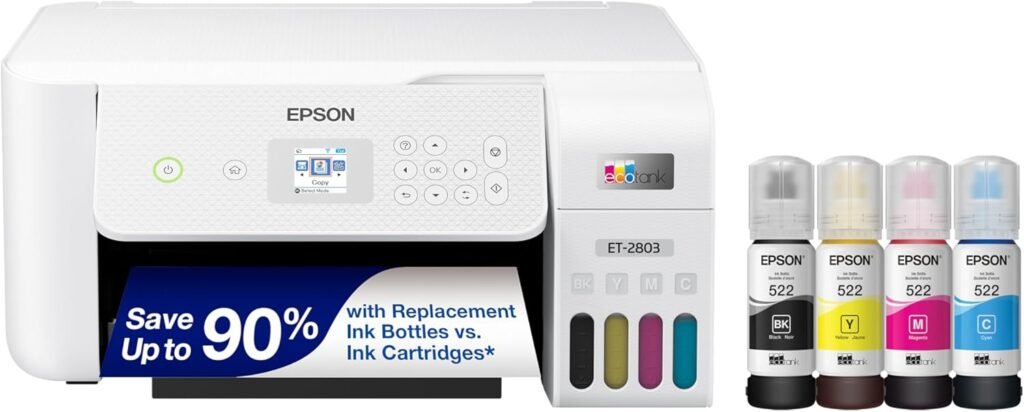
- Ultra-low printing cost (cartridge-free)
- High page yield ink bottles
- Good color printing for everyday use
- Wireless, Wi-Fi Direct & mobile printing
- Supports Apple AirPrint
- Compact and lightweight design
- All-in-one: print, scan, copy
- Slower print speed than laser printers
- No automatic duplex printing
- Basic control panel (no touchscreen)
- Not ideal for high-volume office use
| Feature | Details |
|---|---|
| Printer Type | InkTank (All-in-One: Print/Scan/Copy) |
| Print Speed | Up to 10 ppm (Black) / 5 ppm (Color) |
| Print Resolution | Up to 5760 x 1440 dpi |
| Wireless Support | Wi-Fi, Wi-Fi Direct, Apple AirPrint, Epson Smart Panel App |
| Duplex Printing | No (Manual only) |
| Input Paper Capacity | 100-sheet paper tray |
| Ink System | Cartridge-Free EcoTank (Refillable Ink Bottles) |
| Scanner Type | Flatbed Scanner |
| Display | Basic control panel (no touchscreen) |
| Operating Systems | Windows, macOS, iOS, Android |
| Price Range | Approximately $180–$230 USD |
Design & Build Quality
The Epson EcoTank ET-2803 features a compact and minimalist design that fits comfortably on small desks or home office setups. Unlike bulky office printers, the ET-2803 keeps things simple with a lightweight body and clean layout, making it ideal for students, families, and casual home users. One of its most practical design elements is the front-facing EcoTank system, which allows users to easily monitor ink levels without opening the printer.
Epson has also designed the refill process to be mess-free and beginner-friendly. The transparent ink tanks and uniquely keyed bottles reduce the chances of spills or incorrect refills. While the control panel is fairly basic and lacks a touchscreen display, the physical buttons are easy to use for everyday printing, scanning, and copying tasks. Overall, the build quality feels reliable for its price range and is well-suited for light to moderate home use.
Print Quality & Performance
The Epson EcoTank ET-2803 delivers reliable everyday print quality for home users who want affordable long-term printing without sacrificing essential performance. Text documents appear sharp and clean, making the printer a solid choice for homework, office paperwork, forms, and general daily printing. In addition, color output is vibrant enough for charts, graphics, and occasional photo printing, although it’s not specifically designed for professional photo work.
In this Epson ET-2803 Review, one of the printer’s biggest advantages is its balance between low running costs and dependable everyday usability. The printer offers a maximum print speed of up to 10 pages per minute in black and up to 5 pages per minute in color, which is suitable for light to moderate home printing tasks. While it’s slower than most laser printers, the tradeoff is significantly lower ink costs thanks to Epson’s cartridge-free EcoTank system.
Another major highlight is the included high-capacity ink bottles, which can print up to 4,500 black pages and 7,500 color pages before needing replacements. As a result, users can save substantially on replacement ink compared to traditional cartridge printers. Furthermore, wireless printing works smoothly through Wi-Fi, Wi-Fi Direct, and Apple AirPrint, allowing users to print directly from smartphones, tablets, and laptops with minimal setup.
Ink System & Running Cost
One of the biggest reasons buyers choose the Epson EcoTank ET-2803 is its cartridge-free EcoTank system. Instead of using traditional ink cartridges that require frequent replacements, the ET-2803 uses large refillable ink tanks that dramatically reduce long-term printing costs. Epson includes enough ink in the box to print thousands of pages, making this printer far more economical than most entry-level inkjet models.
The refill process is simple and designed to minimize spills, thanks to Epson’s uniquely keyed ink bottles. For users who regularly print homework, office documents, or color pages at home, the savings can be substantial over time. In this Epson ET-2803 Review, the low cost per page is easily one of the printer’s strongest selling points. While the initial purchase price may be higher than basic cartridge printers, the reduced ink expenses quickly make up for it in long-term use.
Connectivity & Mobile Printing
The Epson ET-2803 offers solid connectivity features that make everyday printing convenient and hassle-free. Built-in Wi-Fi allows users to print wirelessly from laptops, desktops, and mobile devices without needing a direct cable connection. It also supports Wi-Fi Direct, which enables devices to connect directly to the printer even when a traditional wireless network is unavailable.
For mobile users, the printer supports Apple AirPrint, making it easy to print directly from iPhones, iPads, and Mac devices. Android users can also print through the Epson Smart Panel app and other compatible mobile printing services. Setup is generally straightforward, and once connected, wireless printing remains stable for regular home use. These mobile-friendly features make the ET-2803 a convenient option for families, students, and remote workers who frequently print from smartphones or tablets.
Scanning & Copy Features
The Epson EcoTank ET-2803 includes a built-in flatbed scanner and copier that handles everyday home tasks with ease. Whether you need to scan homework, copy documents, or digitize photos, the ET-2803 provides reliable functionality for light daily use. Epson’s high-resolution flatbed scanner delivers clear scans with good detail and accurate colors, making it suitable for basic document archiving and occasional image scanning.
Copy performance is straightforward and user-friendly, allowing quick black-and-white or color copies directly from the printer without needing a computer connection. While it lacks advanced office features like an automatic document feeder (ADF) or fax support, the scanning and copying functions are more than enough for students, families, and remote workers with moderate needs. The Epson Smart Panel app also allows users to manage scanning functions directly from compatible smartphones and tablets.
Who Should Buy Epson ET-2803?
In this Epson ET-2803 Review, the printer is best suited for users who prioritize low running costs and reliable everyday printing over high-speed performance. It’s an excellent choice for students, families, and home office users who regularly print assignments, documents, forms, and occasional color graphics. Thanks to its cartridge-free EcoTank system, it’s especially appealing to buyers who want to avoid constantly replacing expensive ink cartridges.
The ET-2803 is also ideal for casual home users who want wireless printing and mobile convenience through features like Wi-Fi Direct and Apple AirPrint support. However, users with heavy daily workloads or fast-paced office environments may find its print speed somewhat limiting compared to laser printers. For basic home printing with long-term ink savings, though, the Epson ET-2803 remains one of the best budget EcoTank printers available today.
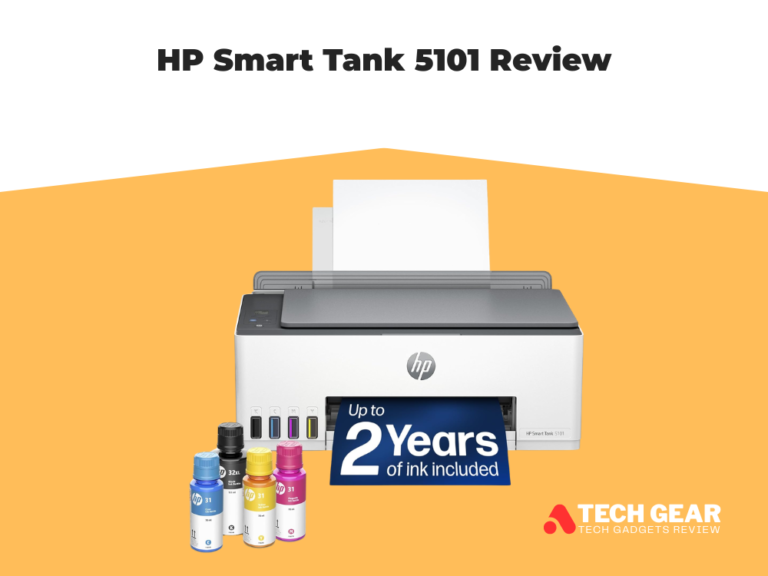
Epson ET-2803 vs HP Smart Tank 5101
When comparing the Epson EcoTank ET-2803 and the HP Smart Tank 5101, both models are designed for home users who want affordable long-term printing with refillable ink tanks. However, the Epson ET-2803 clearly stands out for its better photo quality, sharper color accuracy, and more refined scanning performance. As a result, it becomes the stronger option for students, families, and users who occasionally print photos or colorful documents. In addition, testing from RTINGS shows that the Epson produces more vibrant images with a wider color range while also delivering sharper scans with improved fine detail reproduction.
On the other hand, the HP Smart Tank 5101 still offers solid page yields and dependable everyday printing performance. Nevertheless, it may require more maintenance over time, especially when it comes to printhead clogging. Furthermore, Epson’s EcoTank system is widely appreciated for its simple refill process and lower long-term hassle. In terms of connectivity, both printers support wireless printing and mobile apps. However, the Epson ET-2803 delivers a more polished overall experience thanks to reliable support for Apple AirPrint and the Epson Smart Panel app.
Comprison Table
| Feature | Epson EcoTank ET-2803 | HP Smart Tank 5101 |
|---|---|---|
| Printer Type | EcoTank / Supertank Inkjet | Smart Tank Inkjet |
| Functions | Print, Scan, Copy | Print, Scan, Copy |
| Print Quality | Sharper text & more vibrant colors | Good everyday quality |
| Photo Printing | Better color accuracy & wider color gamut | Decent but less vibrant |
| Ink System | Cartridge-free EcoTank bottles | Refillable Smart Tank bottles |
| Running Cost | Extremely low cost per page | Low cost per page |
| Print Speed | Moderate | Slightly faster |
| Wireless Printing | Wi-Fi, Wi-Fi Direct | Wi-Fi, Bluetooth LE |
| Mobile Printing | Apple AirPrint, Epson Smart Panel | HP Smart App, AirPrint |
| Scanner Quality | Better fine detail & scan clarity | Good for basic scans |
| Automatic Duplex Printing | No | No |
| Automatic Document Feeder (ADF) | No | No |
| Paper Capacity | 100 sheets | 100 sheets |
| Best For | Home users, students, casual photo printing | Basic home & office printing |
| Major Advantage | Better print & scan quality | Faster everyday performance |
| Main Drawback | Slower printing speed | Lower photo quality |
| Overall Winner | Better overall value for most users | Good alternative option |
The Epson EcoTank ET-2803 is the stronger overall option for users who care about print quality, photo output, and long-term reliability. Meanwhile, the HP Smart Tank 5101 is a decent alternative for basic home printing with slightly quicker everyday performance.
Final Verdict
If you’re looking for a reliable, low-cost printer for everyday home use, the Epson EcoTank ET-2803 is one of the smartest buys in its category. Its cartridge-free EcoTank system can save you hundreds of dollars in ink costs over time, while still delivering sharp document printing, vibrant color output, and convenient wireless features like Wi-Fi Direct and Apple AirPrint support. Unlike traditional inkjet printers that constantly require expensive cartridge replacements, the ET-2803 is designed for long-term affordability and hassle-free printing. Combined with built-in scanning and copying features, compact design, and easy mobile printing, it’s an ideal all-in-one solution for students, families, and home offices that want dependable performance without high running costs.