HP DeskJet 2827e Review | Best Budget All-in-One Printer
The HP DeskJet 2827e is a compact, budget-friendly all-in-one printer designed for everyday home printing needs. With print, scan, and copy functions, a 60-sheet input tray, and print speeds up to 7.5 ppm black and 5.5 ppm color, it delivers the essentials for students, families, and small home offices. Despite its low cost, it supports key modern features like Wi-Fi, Wi-Fi Direct, USB, Apple AirPrint, and mobile app printing, making it one of the best budget inkjet printers for simple, reliable daily use. In this HP DeskJet 2827e Review, we’ll look at how its HP Thermal Inkjet technology performs for documents and casual color prints.
We’ll also see how its wireless connectivity holds up in real-world home use and whether its eco-friendly design—made with 60% recycled plastic—gives it an edge in the entry-level category. If you’re searching for an affordable, easy-to-use home printer rather than a heavy-duty office machine, the DeskJet 2827e aims to be a top contender among best budget all-in-one printers.
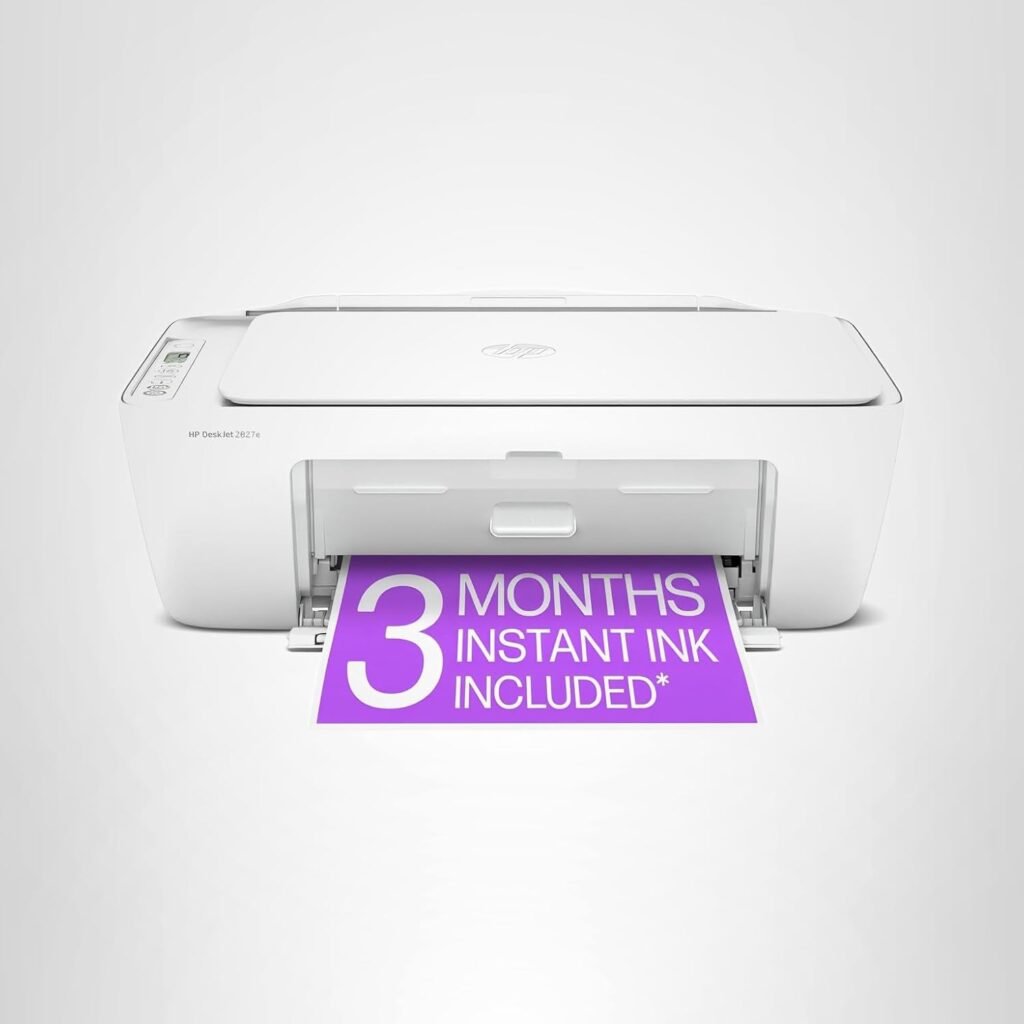
HP DeskJet 2827e Wireless All-in-One Color Inkjet Printer
-
Very affordable all-in-one solution
-
Wireless printing & mobile support
-
Good print quality for documents and casual photos
-
Easy setup and HP Smart app integration
-
Auto Power On/Off and basic convenience features
-
Slower print speed vs office-focused models
-
Single-band Wi-Fi only
-
Ink costs are moderate over long term
-
Not designed for heavy duty or high-volume workflows
-
Limited advanced features/finishing
We chose the HP DeskJet 2827e because it delivers the essential features most home users actually need at one of the lowest price points in its class. For everyday printing—homework, forms, recipes, labels, and simple color projects—the HP DeskJet 2827e offers reliable output without requiring a big investment. Its combination of print, scan, and copy functions, along with a practical 60-sheet input tray, makes it a complete and convenient solution for light home use.
Another standout reason is its exceptional ease of use. HP’s Smart app remains one of the most intuitive mobile printing platforms available, letting users print, scan to PDF, and manage jobs directly from a phone or tablet. The printer’s self-healing Wi-Fi also reduces common connection issues found in budget models, making it more dependable for families and students. Add to that its eco-friendly design made from 60% recycled plastic and support for HP Instant Ink, and the DeskJet 2827e becomes a compelling pick for anyone seeking a best budget inkjet printer that balances cost, convenience, and functionality.
The HP DeskJet 2827e is ideal for users who need a simple, budget printer primarily for light, everyday tasks. In this HP DeskJet 2827e Review, it clearly stands out as a great match for students who need to print assignments or study materials, families handling occasional school forms or household documents, and home office users who require basic color printing without high-volume needs. Its compact size also makes it suitable for small spaces such as dorm rooms, apartments, or shared desks.
This printer is also a practical choice for people who prefer mobile-first printing, since it integrates smoothly with smartphones and tablets through the HP Smart app and AirPrint. Those who value sustainability will also appreciate its recycled-plastic design. However, it’s not meant for users who print large batches, need high-speed output, or require advanced office functions—making it best suited to light-duty, budget-conscious households wanting a dependable all-in-one features.
| Feature | Specification |
|---|---|
| Brand | HP |
| Model | HP DeskJet 2827e All-in-One Printer |
| Printer Type | All-in-One Inkjet (Print / Scan / Copy) |
| Printing Technology | HP Thermal Inkjet |
| Printer Output | Color |
| Max Print Speed (Black) | Up to 7.5 ppm |
| Max Print Speed (Color) | Up to 5.5 ppm |
| Connectivity | Wi-Fi, Wi-Fi Direct, USB, Apple AirPrint, Mobile Printing Support |
| Special Features | Scan to PDF, HP AI print formatting, 60% recycled-plastic design |
| Paper Input Capacity | 60-sheet input tray |
| Mobile App | HP Smart App (Print, Scan, Copy, Fax via mobile) |
| Instant Ink Eligible | Yes — Includes 3 months with HP+ activation |
| Color | White |
| Weight | 3.42 kg (approx.) |
| Sustainable Design | Made from 60% post-consumer recycled plastic |
| Energy Efficiency | Energy Star & EPEAT Certified |
| Intended Use | Home printing — to-do lists, letters, forms, recipes, homework |
| Cartridge Compatibility | Works only with HP chips/circuitry (blocks non-HP cartridges) |
Design & Build Quality
The HP DeskJet 2827e has a compact, lightweight design that fits comfortably in small home spaces, dorm rooms, or home offices where desk real estate is limited. Its white chassis with softly rounded edges gives it a simple and approachable look that blends into most environments without drawing attention. The overall build quality feels appropriate for a budget all-in-one printer; it’s primarily composed of hard plastics that are durable enough for regular, everyday use, though not meant for rugged or heavy commercial workloads.
Despite its entry-level price, the DeskJet 2827e includes thoughtful design details that improve usability. Paper trays are easy to access and load, with the 60-sheet input tray sitting neatly at the front for straightforward paper handling. The small icon LCD and a few tactile buttons make basic functions like copying or status checks easy without needing to dive into a smartphone app every time. Connections like the USB port and power input are logically placed at the rear, keeping cables tidy when placed against a wall or on a shelf. In sum, the DeskJet 2827e’s design is engineered for simplicity and convenience—offering reliable everyday handling without unnecessary complexity or bulk.
Setup & Ease of Use
Setting up the HP DeskJet 2827e is straightforward, even for first-time printer owners. Out of the box, the process involves unpacking the unit, loading paper into the 60-sheet input tray, installing the ink cartridges, and powering on the printer. Unlike some budget models that require hassles with drivers or complicated menus, the DeskJet 2827e walks you through the essential steps with clear on-screen prompts and quick feedback.
Connecting to your network is simple thanks to HP’s reliable Wi-Fi setup and support for AirPrint and mobile printing. You can use the HP Smart app to guide you through wireless connection, manage settings, and initiate tasks without needing a computer. The app also lets you print, scan, and copy directly from your mobile device, which is especially helpful in households or small offices where multiple people print from phones and tablets. Physical controls are minimal but intuitive, with an icon LCD panel and easy-to-use buttons for basic jobs. Overall, the DeskJet 2827e delivers a painless setup and daily operation that suits users who want reliable performance without a steep learning curve.
Print Quality & Performance
The HP DeskJet 2827e delivers balanced print quality for an best budget home printer, offering dependable performance across documents, casual color prints, and light photo tasks. While it’s not built for studio-grade accuracy or heavy workloads, its HP Thermal Inkjet system produces clean text, vibrant colors, and smooth graphics suitable for everyday use. Print speeds are modest but consistent, and output quality remains stable whether you’re printing homework, forms, recipes, or the occasional photo. Overall, the DeskJet 2827e offers reliable print performance that aligns well with its budget-friendly positioning.
Document Printing
The HP DeskJet 2827e produces clean and readable text that works well for typical home and school use. Letters, worksheets, homework assignments, and simple forms print with good clarity, though not at the same density you’d expect from office-grade inkjets or laser printers. For an entry-level model, its black-text sharpness is reliable enough for everyday printing without smudging or noticeable feathering.
Photo Printing
While not designed to compete with dedicated photo printers, the DeskJet 2827e delivers respectable casual photo prints for family snapshots or small personal projects. Colors appear reasonably vivid, and photos look decent on glossy paper, especially at 4×6 sizes. Fine gradients and deeper shadows are less refined compared to higher-end inkjets, but for home use and quick prints, the overall quality is perfectly acceptable.
Graphics & Everyday Tasks
For mixed-content documents — such as school reports, simple charts, invitations, and recipe cards — the DeskJet 2827e provides solid, well-balanced output. Graphics print with good color distribution and minimal streaking as long as you use standard or high-quality paper settings. Everyday tasks like printing emails, tickets, web pages, and forms are handled smoothly, making it a dependable choice for routine home printing needs.
Print Speed & Efficiency
The HP DeskJet 2827e is designed for light home printing, and its speed reflects that purpose. It produces up to 7.5 ppm in black and 5.5 ppm in color, which is adequate for everyday documents, schoolwork, and casual color jobs. While it won’t keep up with office-grade inkjets or lasers, the speeds are consistent and reliable for typical home workflows.
Energy usage is low, warm-up times are minimal, and the printer handles short print bursts efficiently. The compact print engine also keeps noise levels modest, making it suitable for students, contractors, dorm rooms, or small home offices. For users who print occasionally rather than in large batches, the DeskJet 2827e delivers practical day-to-day efficiency without unnecessary delays or interruptions.
Connectivity & Compatibility
The HP DeskJet 2827e offers a solid range of connectivity options for a budget home printer. It supports Wi-Fi, Wi-Fi Direct, USB, Apple AirPrint, Google Cloud Print alternatives, and full integration with the HP Smart App. Wireless setup is straightforward, and once connected, the printer maintains a stable connection thanks to HP’s improved self-healing Wi-Fi technology.
Compatibility is another strong point—users can print from Windows, macOS, iOS, Android, and Chromebooks without extra steps. The HP Smart App makes scanning, copying, and mobile printing simple, providing a unified interface for households with multiple devices. For basic home printing environments, the DeskJet 2827e offers dependable, flexible connectivity that fits into nearly any setup.
Toner & Running Costs Of HP DeskJet 2827e
The HP DeskJet 2827e uses HP Thermal Inkjet cartridges rather than toner, relying on HP 67 or 67XL ink cartridges (varies by region). Ink costs will be higher than laser printers on a per-page basis, but this is expected for an entry-level inkjet designed for low-volume use. The printer supports individual cartridge replacement, so you only replace the color that runs out.
Running costs become more manageable with HP Instant Ink, which the 2827e supports. With HP+ activation, users receive 3 months of Instant Ink free, and afterwards, the subscription automatically delivers ink before levels run low. For light home printing—recipe pages, homework, forms, quick photos—Instant Ink can reduce monthly expenses significantly.
That said, the DeskJet 2827e isn’t ideal for heavy printing. Large color projects or frequent photo printing will deplete cartridges quickly, raising ongoing costs. For occasional use, though, its ink consumption is reasonable and aligns well with its role as one of the best budget all-in-one printers for home users.
Comparison: HP DeskJet 2827e vs Competitors
When choosing an affordable all-in-one printer for home use, it helps to compare key features like connectivity, print quality, speed, and running costs. Below is a snapshot of how the HP DeskJet 2827e stacks up against similar entry-level models from Canon and Epson:
| Feature | HP DeskJet 2827e | Canon PIXMA MG3620 | Epson Expression Home XP-4100 |
|---|---|---|---|
| Printer Type | All-in-One Inkjet | All-in-One Inkjet | All-in-One Inkjet |
| Print Speed (Black) | Up to 7.5 ppm | Up to ~9.9 ipm | Up to ~10.0 ipm |
| Print Speed (Color) | Up to 5.5 ppm | Up to ~5.7 ipm | Up to ~5.0 ipm |
| Max Resolution | HP Thermal Inkjet | Up to 4800 × 1200 dpi | Up to 5760 × 1440 dpi |
| Connectivity | Wi-Fi, Wi-Fi Direct, USB, AirPrint | Wi-Fi, USB, AirPrint | Wi-Fi, Wi-Fi Direct, USB, AirPrint, Mopria |
| Mobile Printing | HP Smart App, AirPrint | Canon PRINT, AirPrint | Epson iPrint, AirPrint, Mopria |
| Input Tray | 60 sheets | 100 sheets | 100 sheets |
| Special Features | HP AI formatting, Instant Ink ready | Borderless photo printing | Auto duplex (some regions), color LCD |
| Best For | Everyday home use, students, casual prints | Basic home print & photo tasks | Family/home with mobile printing needs |
Comparison Summary
HP DeskJet 2827e
• Best choice for households that want a truly simple, budget-oriented all-in-one with excellent mobile app support and reliable wireless printing. The self-healing Wi-Fi and HP Smart app make setup and multi-device use less frustrating.
• Slightly slower print speeds than some rivals, but it’s balanced by an intuitive user experience and strong app ecosystem.
Canon PIXMA MG3620
• Often slightly faster in black text printing and offers solid resolution for casual photo prints. A good pick if you want a straightforward all-in-one with slightly better photo dpi specs.
• Connectivity is solid, but mobile support and automation features generally trail behind HP’s Smart app experience.
Epson Expression Home XP-4100
• A bit more feature-rich for families with a small color LCD and broader connectivity (Mopria + app support).
• Input capacity is class-typical, and color quality often edges out in budget Epson models, though ink costs can be slightly higher.
Which One Should You Pick HP DeskJet 2827e Or Else?
- Go with the HP DeskJet 2827e if you want the easiest setup, reliable wireless performance, and strong mobile printing — especially for students, families, and casual users.
- Choose a Canon PIXMA model if you care more about slightly higher print resolution and basic photo printing at a comparable price.
- Pick an Epson model if you want broader app compatibility and extra features like an LCD screen and sometimes auto-duplex functionality.
Where HP DeskJet 2827e Falls Short
The HP DeskJet 2827e is clearly built for light, occasional use, so its biggest limitation is speed and durability. With up to 7.5 ppm black and 5.5 ppm color, it feels slow if you regularly print multi-page assignments, reports, or large PDFs. The 60-sheet input tray also means more frequent refills, which can get annoying in a busy household. It’s not designed for heavy-duty workloads or shared office environments.
Another drawback is ink cost and cartridge lock-in. Like most entry-level inkjet printers, the DeskJet 2827e relies on HP cartridges with HP chips, and the firmware is designed to block many third-party options. That means you’re largely tied to original HP ink, which can push the cost per page higher over time—especially if you print color frequently and don’t use HP Instant Ink. There’s also no automatic duplex printing, so double-sided jobs require manual flipping, and you don’t get extras like an LCD with full menus, Ethernet, or advanced photo features. In short, it’s great for basic home printing, but not ideal if you need serious speed, low running costs, or office-grade functionality.
Final Verdict
The HP DeskJet 2827e stands out as one of the most budget-friendly all-in-one printers for everyday home use, especially for students, families, and casual users who want reliable performance without a hefty price tag. It delivers solid document quality, respectable color printing for casual photos, and easy wireless connectivity with AirPrint and the HP Smart app. Its compact build and simple controls make it a practical choice for small spaces, and features like HP AI formatting and Instant Ink eligibility enhance convenience and long-term value.
However, the DeskJet 2827e isn’t without its limitations: modest print speeds, a small input tray, and higher ink costs over time put it behind some rivals for heavy workloads or frequent photo printing. It also lacks automatic duplexing and advanced office features. Still, if you’re looking for an affordable, easy-to-use home printer that handles everyday tasks with ease, this model delivers dependable performance for its class. In short, this HP DeskJet 2827e Review shows that it remains a compelling pick in 2026 for budget-minded buyers who prioritize simplicity, wireless ease, and essential functionality.