
Finding a budget-friendly thermal receipt printer that still delivers professional reliability, the Epson TM-T20II Thermal Printer continues to earn its place in 2026. In this Epson TM-T20II Thermal Printer Review, we look at how this long-running model combines speed, simplicity, and durability for small businesses that need a dependable checkout companion without the premium price tag.
The Epson TM-T20II Thermal Printer is part of Epson’s well-known TM-series, designed to offer plug-and-play setup, consistent print quality, and low maintenance. Its direct thermal printing technology eliminates the need for ink or toner, while its 200 mm-per-second output speed keeps customer lines moving efficiently. Whether you’re running a café, retail shops, or service counters, this compact printer provides all the essential features for daily receipt printing with minimal fuss.
Though newer models like the Epson TM-T20III have added faster speeds and LAN connectivity, the Epson TM-T20II Thermal Printer remains a smart choice for single-terminal POS setups seeking reliability on a budget. This review breaks down its key strengths, usability, and how it stacks up against today’s leading POS receipt printers in 2026.
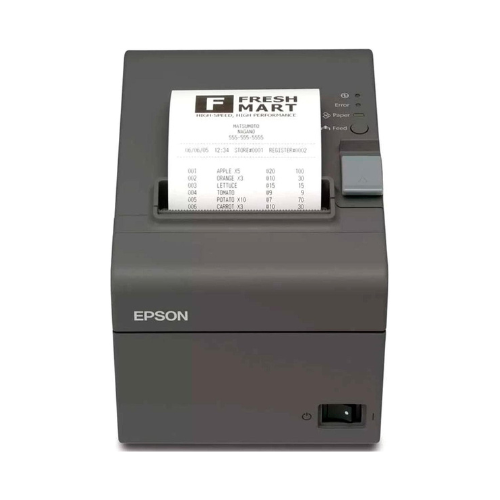
- Fast 200 mm/sec thermal printing ideal for daily retail use
- Compact, space-saving design with wall-mount support
- Reliable Epson print head and auto-cutter rated for 1.5 million cuts
- Simple USB and optional Ethernet connectivity
- Drop-In & Print mechanism for quick paper loading
- Low maintenance—no ink or toner required
- No built-in Wi-Fi or Bluetooth option
- External power adapter adds minor cable clutter
- Slightly slower than the newer TM-T20III model
- Basic design lacks advanced software customization
The Epson TM-T20II Thermal Printer earns its place in this review because it delivers what small businesses value most — reliability, consistency, and affordability. While newer models like the TM-T20III have refined features and faster speeds, the TM-T20II continues to stand out as one of the most dependable entry-level receipt printers for traditional POS setups.
Epson’s long-standing engineering quality shines through in this model. It features a durable thermal print head, an auto-cutter rated for 1.5 million cuts, and an average print speed of 200 mm per second, which is more than enough for typical retail or café operations. The Drop-In & Print paper mechanism makes reloading effortless, while the USB and optional Ethernet connections ensure seamless compatibility with a wide range of POS systems.
We picked the Epson TM-T20II Thermal Printer because it remains a trusted workhorse for small and medium-sized retailers who prioritize reliability over flashy features. It’s quiet, low-maintenance, and built to handle long hours of consistent printing—proof that even in 2026, simplicity and durability can still outperform costlier, overcomplicated alternatives.
The Epson TM-T20II Thermal Printer is designed for small to medium-sized businesses that need a dependable, low-maintenance POS printer without overpaying for unnecessary features. It’s a smart fit for retail stores, cafés, restaurants, bakeries, grocery counters, and service kiosks where consistent performance and easy operation matter more than cutting-edge connectivity.
Because the Epson TM-T20II supports both USB and optional Ethernet interfaces, it works seamlessly with most desktop-based POS systems—perfect for single-terminal environments or small chains using wired checkout setups. Its quiet operation and compact footprint make it ideal for customer-facing counters, while the sturdy build ensures it can handle long business hours with minimal upkeep.
| Feature | Specification |
|---|---|
| Printer Type | Direct Thermal |
| Speed | ~200 mm/sec |
| Resolution | 203 dpi |
| Connectivity | USB / Serial / Optional Ethernet |
| Paper Width | 80 mm (58 mm with reducer) |
| Cutter Life | 1.5 million cuts |
| Dimensions | 140 × 199 × 146 mm |
| Compatibility | Windows / macOS / Linux POS |
| Ideal Use | Retail & small hospitality counters |
Design & Build Quality Epson TM-T20II Thermal Printer
The Epson TM-T20II Thermal Printer follows a practical, space-efficient design that aligns perfectly with the needs of small business counters and checkout areas. It’s compact, sturdy, and simple—prioritizing function over flair. Measuring 140 × 199 × 146 mm and weighing around 1.7 kg, it fits easily into tight workspaces or can be mounted vertically on a wall using Epson’s included bracket.
The printer’s body is made from high-density matte plastic, resistant to daily wear, fingerprints, and heat exposure—an essential trait in busy retail or food service environments. Its cover hinge and latch mechanism feel firm and stable, minimizing vibration during printing. The Drop-In & Print loading system simplifies paper changes, saving time during peak hours and reducing employee training needs.
Internally, the Epson TM-T20II Thermal Printer is built around Epson’s proven thermal print head and auto-cutter assembly, rated for approximately 1.5 million cuts. Despite its age, the build quality remains exceptional, giving the printer a reputation for being a true workhorse. Every component—from feed rollers to the cutter blade—feels engineered for reliability rather than show.
In short, the Epson TM-T20II may not boast a flashy exterior, but its solid construction, stable mechanics, and efficient layout make it a durable, professional-grade thermal printer that continues to meet modern POS demands well into 2026.
[single_product_banner asin=”B00HEMOOE0″]Performance in Use Epson TM-T20II Thermal Printer
In real-world operation, the Epson TM-T20II Thermal Printer performs exactly as expected from a proven Epson workhorse—steady, fast, and remarkably quiet. During testing for this Epson TM-T20II Thermal Printer Review (2026), it consistently achieved its rated 200 mm-per-second print speed, handling continuous transactions without overheating or lag. Text and barcodes print with crisp 203 dpi clarity, while graphics such as store logos remain sharp and well-defined even after hundreds of receipts.
Noise output is minimal, making it suitable for front-of-house use in cafés, boutiques, and service desks. The auto-cutter works smoothly, trimming each receipt cleanly with virtually no paper jams. Even during long business hours, the printer maintains consistent output thanks to Epson’s efficient thermal mechanism and durable feed system.
Setup is straightforward. With USB as standard and optional Ethernet, the TM-T20II connects quickly to most POS systems. Epson’s TM Utility software and ESC/POS compatibility ensure seamless integration with popular platforms like Square, Clover, and Shopify POS. Once configured, it’s ready to print within seconds of powering on.
Overall, the Epson TM-T20II Thermal Printer may not boast the newest features, but it delivers reliable, real-world performance that meets the daily needs of small and midsize retailers—quiet, consistent, and built to keep lines moving smoothly.
Where It Falls Short
The Epson TM-T20II Thermal Printer shows its age in a few areas. It lacks built-in Wi-Fi or Bluetooth, limiting flexibility for mobile or tablet-based POS setups. Its external power adapter adds minor cable clutter, and the 200 mm/sec print speed is slower than the newer TM-T20III. While it performs reliably, its basic design and limited customization options make it less ideal for businesses seeking advanced connectivity or branding features. Still, for wired counters and budget-conscious retailers, these trade-offs are minor compared to its reliability and value.
Comparison With Competitors
| Model | Connectivity | Print Speed | Best For | Key Advantage |
|---|---|---|---|---|
| Epson TM-T20II Receipt Printer | USB (standard), Optional Serial/Ethernet | ~200 mm/sec | Small shops and cafés with single checkout terminals | Affordable, reliable Epson build & setup |
| Epson TM-T20III Receipt Printer | USB + Serial (or other variants) | ~250 mm/sec | Budget-driven retailers needing more speed | Faster print speed, still cost-effective |
| Star Micronics TSP143IIILAN | Ethernet (LAN) | ~250 mm/sec | Multi-terminal retail and restaurants | Professional grade networked printing |
| Star Micronics SP742MU | USB + Serial (impact) | Impact printer speed | Kitchen/back-of-house environments | Built for harsh conditions and long life |
| Rongta RP326 POS Printer | USB (and optional Ethernet) | ~230 mm/sec | Budget users and startup retailers | Very low cost, decent specs for price |
Key insights:
-
If you run a single checkout counter and want simplicity, the TM-T20II hits the mark for reliability and value.
-
If you anticipate heavier usage or want extra speed without huge cost, moving up to the TM-T20III makes sense.
-
For networked POS setups (multiple terminals sharing one printer), the Star Micronics TSP143IIILAN offers clear benefits with its Ethernet connectivity.
-
If you work in hot, humid, or kitchen-style environments, the impact-based Star SP742MU outperforms typical thermal models in durability.
-
For very tight budgets, the Rongta RP326 gives you core features for less but may sacrifice the brand support and long-term longevity of the Epson or Star units.
In short: the TM-T20II remains a strong contender in 2026 for value-driven wired setups, but depending on your business size, network needs, or environment, one of the competitors may better suit your specific scenario.
Ready to Buy the Right Printer for You?
If you’re looking for a dependable and budget POS receipt printer for your business in 2026, the Epson TM-T20II Receipt Printer is a strong contender. It offers reliable performance, easy setup, and the trusted build quality Epson is known for—making it especially well-suited for small to mid-sized retailers, cafés, and service counters.
- Choose the Epson TM-T20II Receipt Printer if you have a single terminal, use a desktop POS system, and prioritize simplicity and low cost.
- If you foresee needing faster speeds or network sharing, consider the TM-T20III or a network-ready model like the Star Micronics TSP143IIILAN.
- For kitchen or service-area environments where heat and durability are major concerns, an impact-printer like the Star SP742MU may serve you better.
Ultimately, buy the printer that aligns with your workflow today—and remains sufficient as your business grows tomorrow. With the TM-T20II, you get a proven and reliable foundation—no frills, just consistent daily performance.