Epson SureColor F170 Review | Best Budget Dye-Sublimation Printer
The Epson SureColor F170 is a compact, purpose-built dye-sublimation printer designed for crafters and small businesses that want reliable, conversion-free sublimation printing for items like T-shirts, mugs, tote bags, and coated blanks. Using Epson’s dedicated T49M sublimation inks and PrecisionCore technology, it delivers consistent color transfers and sharp detail while supporting media up to 8.5 inches wide, including longer banner-style prints. With easy setup, predictable running costs, and flexible connectivity options such as Wi-Fi, Ethernet, and USB, it’s well suited for beginners and light production environments—making it a strong entry-level option, as highlighted in this Epson SureColor F170 review.
Aimed at beginners and light-to-moderate production users, the Epson F170 focuses on ease of setup, predictable output, and reliable connectivity rather than wide-format capacity or high-volume industrial speed. Built-in Wi-Fi, Wi-Fi Direct, Ethernet, and USB connections allow it to fit into home studios, shared workspaces, or small shops with minimal hassle. In this Epson SureColor F170 Review, we’ll take a close look at print quality, color performance, running costs, setup experience, and who this entry-level sublimation printer is best suited for in real-world creative and small-business use.
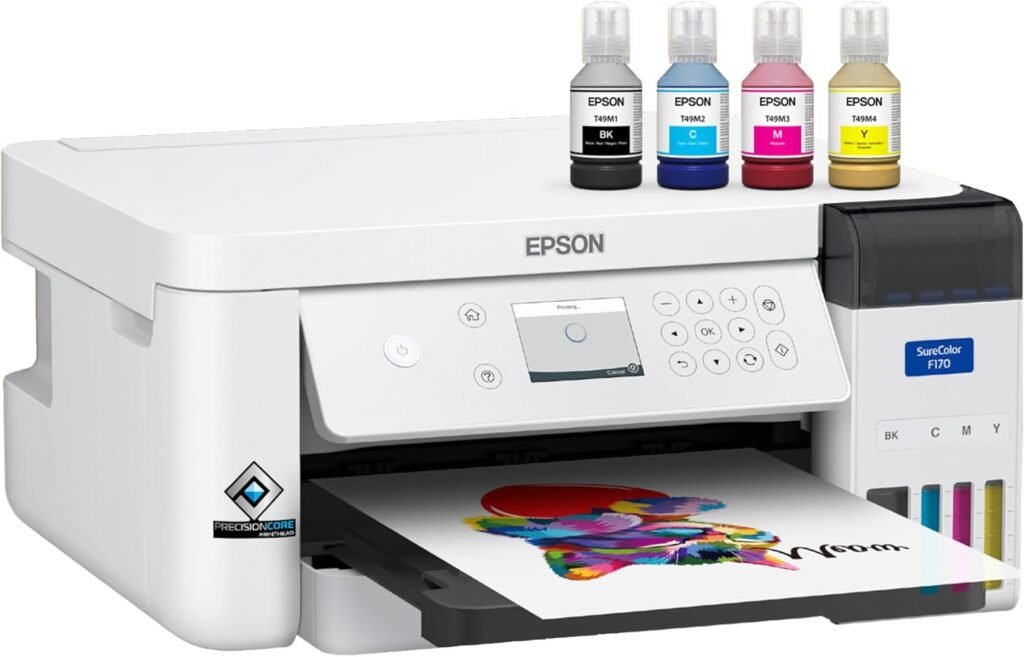
- Purpose-built dye-sublimation printer (no conversion or third-party inks required)
- Excellent choice for beginners and small businesses entering sublimation
- Refillable T49M ink bottles keep running costs predictable
- Sharp text and vibrant color transfers for shirts, mugs, and coated blanks
- Supports long prints up to 47.2 inches for small wrap-style designs
- Strong connectivity options: Wi-Fi, Wi-Fi Direct, Ethernet, and USB
- Compact footprint fits easily in home studios or small workspaces
- Often considered one of the Best Budget Sublimation Printer options in its class
- Limited to 8.5-inch-wide media (not wide-format)
- Print-only device (no scan or copy functions)
- Requires a heat press and compatible blanks to complete the sublimation process
- Not designed for high-volume or commercial-scale production
- Best results require polyester fabrics or specially coated materials
We chose the Epson SureColor F170 because it delivers a purpose-built sublimation experience in a compact, easy-to-use package that’s ideal for crafters and small business makers entering the world of custom products. Unlike converted inkjets or general printers adapted for sublimation, the Epson F170 uses factory-matched sublimation inks (T49M) and PrecisionCore printhead technology to reliably transfer vibrant, consistent images onto coated blanks and polyester fabrics. Its combination of predictable color output, refillable bottles, and robust connectivity (Wi-Fi, Wi-Fi Direct, Ethernet, USB) makes it a standout choice among entry-level machines — a key reason it’s often regarded as one of the Best Budget Sublimation Printer options available.
The Epson F170 also strikes a strong balance between performance and accessibility. It supports long prints up to 8.5 inches wide, handles standard media sizes with ease, and integrates well into a variety of workflows without complicated conversions or ink substitutions. Whether you’re producing custom T-shirts for an online shop, printing personalized gifts, or experimenting with sublimation for the first time, the Epson SureColor F170 delivers consistent quality and dependable operation that help simplify your creative process.
The Epson SureColor F170 is ideal for beginners, hobbyists, and small business owners who want a dedicated sublimation printer that delivers consistent results without the complexity of converted inkjets. It’s especially well-suited to those producing custom products like T-shirts, tote bags, mugs, and small hard goods, where vibrant color reproduction and transfer clarity are important.
This printer is also a great fit for:
- Etsy sellers and craft entrepreneurs launching or scaling their product lines
- Small studios that need reliable sublimation without high upfront costs
- Designers and makers transitioning from vinyl to dye-sublimation workflows
- Home business owners who value predictable running costs and refillable inks
However, the Epson F170 may be less suitable for users who require wide-format sublimation, high-volume commercial production, or professional photo-lab quality output. If your needs focus heavily on large banners, bulk orders, or ultra-high detail photography transfers, you might consider a step-up sublimation model or a larger format system.
| Feature | Specification |
|---|---|
| Brand | Epson |
| Model | Epson SureColor F170 |
| Printer Type | Dye-Sublimation Transfer Printer |
| Printing Technology | PrecisionCore MicroTFP Dye-Sublimation |
| Ink Type | Epson T49M Sublimation Ink (CMYK Bottles) |
| Max Print Resolution | Up to 1200 × 600 dpi |
| Max Media Width | 8.5 inches |
| Max Print Length | 47.2 inches (long-format capable) |
| Paper Handling | Up to 150 sheets (roll or cut sheet) |
| Display | 2.4″ Color LCD with Buttons |
| Connectivity | USB, Ethernet, Wi-Fi, Wi-Fi Direct |
| Mobile Printing | Wi-Fi Direct / Network Printing |
| Operating Systems | Windows & macOS (driver support) |
| Dimensions (Approx.) | Compact desktop footprint |
| Weight (Approx.) | Printer only (varies by configuration) |
| Best For | Custom transfers, apparel, mugs, totes (small business & hobby) |
Design & Build Quality
The Epson SureColor F170 features a compact, purpose-driven design focused on efficiency and everyday usability, making it ideal for home studios, craft rooms, and small businesses. Its solid chassis with a matte white and gray finish feels durable, resists fingerprints, and remains stable during longer print jobs, while its modest desktop footprint prevents it from overwhelming limited workspace areas.
Up front, a 2.4-inch color LCD with tactile buttons provides clear, intuitive control for setup, ink checks, and media selection. Media loading is straightforward thanks to clearly labeled paper paths and smooth roll or cut-sheet handling, while the auto-stop sublimation ink fill system helps minimize spills during refills. Overall, the layout keeps frequently used components within easy reach, reinforcing the F170’s focus on reliable operation, low maintenance, and practical day-to-day use for creative workflows.
Setup & Ease of Use
Setting up the Epson SureColor F170 is straightforward, even for users new to sublimation printing. Out of the box, unpacking and positioning the printer on a desk or worktable takes only a few minutes, and Epson’s setup guide walks you through installing the T49M sublimation ink bottles, loading media (roll or cut sheets), and connecting to a computer or network. The 2.4-inch color LCD and physical buttons provide clear prompts for basic configuration, making Wi-Fi, Wi-Fi Direct, Ethernet, or USB setup accessible without frustration. Once connected, drivers install quickly on both Windows and macOS, and the Epson print utility offers easy access to print settings and maintenance tools.
In everyday use, the epson F170’s controls and workflow are designed with simplicity in mind. Loading paper, checking ink status, and switching between media types are intuitive thanks to well-marked guides and a logical paper path. For users printing transfers to apply with a heat press, the transition from print to transfer is seamless, and common sublimation settings such as mirror printing and media type selection are easily accessed through the driver interface. The overall experience feels user-friendly and predictable, which helps reduce setup mistakes and lets creative users spend more time on design and finishing rather than troubleshooting printer configuration.
Print Quality (Sublimation Transfer Results)
The Epson SureColor F170 delivers excellent text clarity on sublimation transfers, with strong edge sharpness and solid blacks that hold up well on both polyester fabrics and coated hard goods. Small fonts remain legible after transfer, without noticeable feathering or break-up in the darker tones, which is critical for printing crisp labels, intricate logos, or detailed design elements. Whether you’re creating custom apparel with tight lettering or promotional products with fine text, the F170 consistently transfers sharp and readable results.
Color Graphics Printing Quality
Color graphics printed on the Epson F170 show vibrant saturation and smooth gradients across a broad range of hues. Logos, charts, and bold icons maintain clear separation between adjacent colors with minimal banding in typical sublimation workflows, giving designs a polished look straight off the heat press. Saturated colors retain depth without appearing washed out, and complex gradients transition smoothly — especially on high-quality transfer paper. While subtle skin-tone transitions can be more challenging in dye-sublimation than in traditional photo printing, the F170 produces predictable, balanced results that are well suited to most custom product designs.
Photos Printing Quality
When it comes to photo transfers, the F170 produces good overall detail and contrast on sublimation blanks, with smooth tonal transitions and pleasing depth in midtones. On polyester fabric, images appear crisp and bold, showing fine detail and strong contrast across both light and dark areas. On coated hard goods such as mugs or plaques, photo transfers retain strong colors and sharp edges, though the inherent texture and curvature of hard surfaces can slightly affect perceived smoothness. In both cases, the printer’s output exhibits minimal graininess, and with the right transfer and heat-press settings, result quality rivals what many small business creators expect for casual photography applications.
Differences on Different Blanks
The type of sublimation blank influences the final look: on 100% polyester fabrics, dye saturation and color vibrancy tend to be strongest, producing rich, consistent results across large areas. On coated hard goods (ceramic, aluminum, coasters), colors remain vibrant, but surface characteristics and coating quality play a larger role in how smooth and even the image appears after pressing. Light-colored or white substrates generally yield the best fidelity and contrast, while darker or unevenly coated surfaces may mute tones or affect edge clarity. Overall, the Epson F170 adapts well across common blanks, giving creators flexibility without compromising on print quality.
Speed & Media Handling
The Epson SureColor F170 offers steady, predictable print speeds for dye-sublimation transfers, though it isn’t designed for high-volume production like wide-format or industrial printers. When printing standard sizes such as Letter/A4 or typical transfer templates, the printer moves through jobs at a consistent pace that keeps craft and small-business workflows moving—enough to produce shirts, mugs, or small items without long waits. Longer prints, such as banner-style transfers approaching the maximum 47.2-inch length, naturally take more time because of increased ink laydown and media movement, but the process remains smooth thanks to Epson’s PrecisionCore MicroTFP technology, which balances head movement and ink application for reliable output.
Media handling on the Epson F170 is straightforward. It accepts cut sheets and roll media up to 8.5 inches wide, and loading media is intuitive with clear guides and a stable feed path. The printer maintains good registration and media tracking throughout most jobs, which is critical for transfer accuracy when aligning graphics or repeated patterns. Because sublimation workflows also depend on post-printing steps (such as applying the transfer with a heat press), the printer’s speed is best judged in combination with how quickly and accurately users can prepare finished products. In most small-business and home-studio environments, the F170’s pace and media handling keep creative projects moving without unnecessary frustration.
Ink & Running Costs
The Epson SureColor F170 uses T49M dye-sublimation ink bottles in a CMYK configuration, designed specifically for sublimation transfer workflows. Ink costs for sublimation printers like the F170 depend largely on how often you print and the percentage of coverage on your designs rather than simple page counts. Because sublimation ink is used to create transfers rather than direct prints on paper, your real running cost includes ink, sublimation paper, and heat press materials/time — all of which factor into the true cost per finished product.
The F170’s bottle system helps keep ongoing ink expenses predictable and easy to manage. Each bottle holds a generous volume of sublimation ink suited to frequent print jobs, and refilling is designed to be clean and straightforward with dedicated fill ports that help reduce waste and mess. For creators or small shops doing regular custom runs, this approach usually results in lower per-print costs than cartridge-based alternatives adapted for sublimation, as noted in this Epson SureColor F170 review.
It’s important to note that sublimation printing also involves consumables beyond ink: transfer paper and compatible blanks (such as polyester garments or coated mugs) contribute to the overall running cost. These elements vary widely in price depending on materials and suppliers. If high output volume or minimal per-item cost is a priority, reviewing bulk pricing on sublimation paper and blanks — plus considering high-yield ink usage patterns — will help you manage long-term expense more effectively. Overall, the F170 delivers reasonable running costs for its class when paired with thoughtful material planning and efficient workflow practices.
Connectivity & Compatibility
The Epson SureColor F170 offers a flexible set of connectivity options that suit both individual creatives and small business workspaces. It supports Wi-Fi and Wi-Fi Direct, allowing you to print wirelessly from desktop computers, laptops, and mobile devices without the need for a network router. This makes it easy to integrate the F170 into shared workspaces or home studios where multiple users or devices need access. For more stable connections — particularly in busy environments — the printer also includes Ethernet, giving you a reliable wired option for networked workstations.
In addition to network connectivity, the F170 features USB support for direct connection to a single computer, which can be helpful for standalone setups or dedicated production stations. On the software side, it’s compatible with both Windows and macOS via Epson’s dedicated drivers, and printing from creative applications or design software is seamless once the driver is installed. While it doesn’t support mobile apps in the same way as general office printers (because its primary function is sublimation transfer rather than document printing), the available connectivity choices cover virtually all common workflows you’ll encounter in sublimation projects, making the F170 versatile and easy to fit into your existing setup.
Epson F170 Sublimation Printer vs Sawgrass SG500
When you’re comparing the Epson SureColor F170 and the Sawgrass SG500, you’re essentially choosing between two popular entry-level dye-sublimation printers geared toward small business owners, crafters, and makers. Both are designed to turn digital designs into vibrant finished products via sublimation transfer, but they differ in ecosystem, workflow support, and overall cost of ownership.
Epson SureColor F170 Sublimation Printer
The Epson F170 is Epson’s purpose-built dye-sublimation solution that uses Epson’s T49M sublimation inks from the outset, eliminating the need for aftermarket conversions or ink tinkering. It handles media up to about 8.5 inches wide, including longer lengths, which is ideal for transfers to apparel, home goods, and custom products. Its setup is straightforward: fill the ink tanks, load compatible sublimation paper, and print. With strong connectivity options — Wi-Fi, Wi-Fi Direct, Ethernet, and USB — it integrates smoothly into a small studio or home office. The F170 emphasizes predictable output and Epson-backed support, making it a good choice for beginners moving into sublimation or small businesses focused on consistent transfer quality with minimal fuss.
Sawgrass SG500 Sublimation Printer
The Sawgrass SG500 has long been a go-to in the sublimation community, supported by Sawgrass’ robust ecosystem and software, especially CreativeStudio (Sawgrass’ cloud design platform). It also targets media widths up to about 8.5 inches, covering many of the same product types as the Epson F170. Where it really stands out is software and workflow: Sawgrass provides built-in color management profiles and design tools aimed specifically at sublimation products, which can simplify color accuracy and design setup for users who may not be as confident with manual profile adjustments. The SG500 also has a strong reputation for reliable small-format dye-sublimation printing and extensive user support from the Sawgrass community.
| Feature | Epson SureColor F170 | Sawgrass SG500 |
|---|---|---|
| Printer Type | Dye-sublimation printer | Dye-sublimation printer |
| Max Media Width | Up to ~8.5″ | Up to ~8.5″ |
| Ink System | Epson T49M sublimation ink bottles | Sawgrass Sublijet HD cartridges |
| Ink Capacity | Bottle-based (larger volume, refillable) | Cartridge-based |
| Print Resolution | Up to 1200 x 600 dpi | Up to 1200 x 1200 optimized |
| Connectivity | USB, Wi-Fi, Wi-Fi Direct, Ethernet | USB, Ethernet |
| Included Software / Design Tools | Basic printer drivers; third-party tools needed for design | Sawgrass **CreativeStudio** online design tools |
| Ease of Setup | Simple ink fill + drivers | Straightforward, with added software integration |
| Best For | Beginners & small businesses who want Epson reliability and simple sublimation setup | Users who want sublimation plus integrated design/color workflow support |
| Recommended Use Case | Custom apparel, mugs, small blanks, banners | Custom apparel, promotional items, detailed designs with guided workflows |
Which One Is Right for You?
- Choose Epson F170 if: you want a straightforward, Epson-brand sublimation workflow with strong connectivity and reliable everyday operation. Its ease of setup and Epson-backed performance make it a solid choice for beginners and small businesses that prioritize simplicity and consistent transfers.
- Choose Sawgrass SG500 if: you value software ecosystem and color management tools tailored to sublimation and want an all-in-one platform with built-in design support. The SG500’s workflow, backed by CreativeStudio, can reduce time spent on color profiling or design prep, which may benefit users producing varied product lines.
Both printers serve similar use cases, but the F170 leans toward ease of operation and Epson reliability, while the SG500 leans toward software support and color workflow assistance — making it especially attractive for users who want a more guided sublimation experience.
Ready To Buy?: Epson F170 Sublimation Printer Final Verdict
The Epson SureColor F170 stands out as a best entry-level dye-sublimation printer that makes the move from traditional crafting to sublimation simple and reliable. Unlike standard printers that require aftermarket conversions, it’s purpose-built with T49M sublimation inks and Epson’s stable print engine, delivering predictable transfer results right out of the box. Support for media up to 8.5 inches wide and strong connectivity options—including Wi-Fi Direct, Ethernet, and USB—make it well suited for both home studios and small business environments.
In real-world use, the F170 produces crisp text and vibrant color graphics on transfer paper, resulting in bold, consistent output on polyester fabrics and compatible coated blanks. While it doesn’t offer the width or speed of higher-end commercial models, it delivers an excellent balance of price, reliability, and ease of use for beginners and small-to-medium production needs. For creators who value a straightforward, dependable sublimation workflow without unnecessary complexity, this Epson SureColor F170 review confirms it as a smart and capable choice.